
LG Thrill 4G Phone Buttons Replacement

Kenny Richmond and 11 other contributors
Last updated on Jun 7, 2023
Views: 1.1K
View statistics:
- Past 24 Hours:
- 1
- Past 7 Days:
- 23
- Past 30 Days:
- 94
- All Time:
- 1,052
Comments: 0
No one has left comments on this guide. Will you be first?
Go to guide commentsCompleted: 0 1
No one has marked this guide "completed." Will you be the first?
1 person has marked this guide "completed." It's you — great job!
Favorites: 0 1
No one has favorited (and subscribed to) this guide. Will you be the first?
1 person has favorited (and subscribed to) this guide — and that's you!
Introduction
Go to step 1 ↓Many people enjoy their phones by texting, calling, browsing, gaming, etc. After a while you may notice that your button pad is not registering as well or in some cases at all. Instead of spending the money to purchase a new phone in its entirety, this easy to follow guide will take you step by step in replacing your LG Thrill 4G phone buttons. Only two tools will be needed for this replacement which are an iFixit opening tool, as well as a Phillips #00 screwdriver. Save money now and use this guide to get your phone buttons back in working condition!
What you need
Tools


-
-
-
Pry open the back cover by using a fingernail or a plastic opening tool.
 Ask FixBot
-
-
-
-
-
Remove the three Philips #00 screws from the bottom of the phone.
-
Two 5.5 mm screws
-
One 4 mm screw
-
-
-
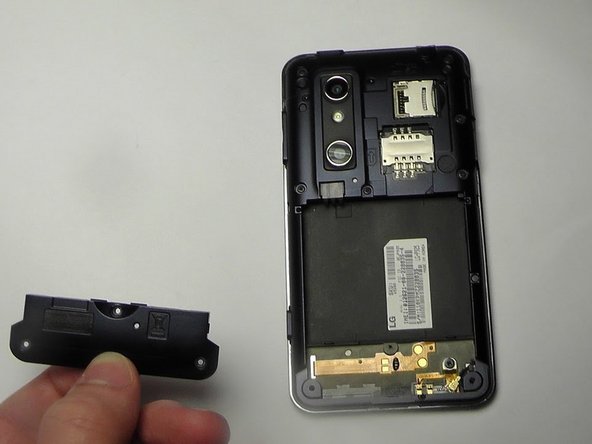
Use your finger or opening tool to wedge the speaker out starting at the small notch at the bottom of the phone.
-
-
-
-
-
-
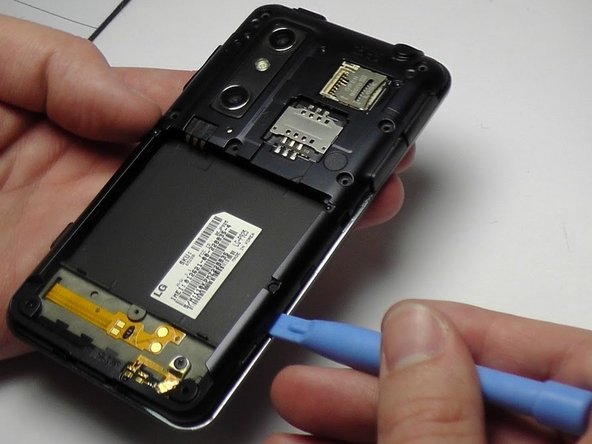
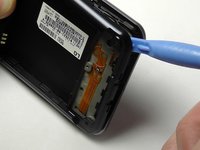
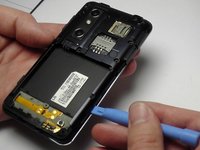
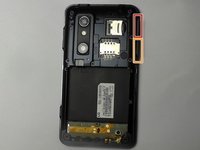
Place the plastic opening tool under the bezel at either bottom corner of the HDMI cover.
-
USB Cover
-
HDMI Cover
-






To reassemble your device, follow these instructions in reverse order.

Team

USF Tampa, Team 1-6, Blackwell Winter 2015 Member of USF Tampa, Team 1-6, Blackwell Winter 2015
USFT-BLACKWELL-W15S1G6
3 Members
60 Guides authored
