15% Off Selected iFixit Tools — Limited Time
Free Shipping on Domestic Orders $75+

LG L1200 Keypad Replacement

What you need

  1. LG L1200 Keypad Replacement, Logic Board: step 1, image 1 of 1
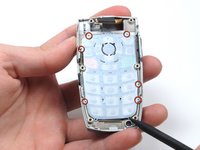
    • Make sure you remove the battery by lifting the tab on the back of the phone before opening the case.

    • Poke out rubber covers using a spudger or pointy object, such as a thumb tack.

    Ask FixBot

    Add Comment

  2. LG L1200 Keypad Replacement: step 2, image 1 of 1
    • Use a T6 torx screwdriver to unscrew the 6 screws that hold the back casing on.

    Ask FixBot

    Add Comment

  3. LG L1200 Keypad Replacement: step 3, image 1 of 1
    • Use IPod opening tool to separate back housing.

    • There are two tabs located on either side of the phone.

    Ask FixBot

    Add Comment

  4. LG L1200 Keypad Replacement: step 4, image 1 of 1
    • Separate the back housing from the phone.

    • Be careful not to rip out the wire (highlighted in yellow) when separating the back housing.

    Ask FixBot

    Add Comment

  5. LG L1200 Keypad Replacement: step 5, image 1 of 1
    • Use a spudger to disconnect antenna wire.

    Ask FixBot

    Add Comment

  6. LG L1200 Keypad Replacement: step 6, image 1 of 1
    • Use the IPod opening tool to pop out the logic board.

    Ask FixBot

    Add Comment

  7. LG L1200 Keypad Replacement: step 7, image 1 of 1
    • Use the IPod opening tool to disconnect the main ribbon.

    Ask FixBot

    Add Comment

  8. LG L1200 Keypad Replacement: step 8, image 1 of 1
    • Once the ribbon is detached, remove the logic board and replace if necessary.

    Ask FixBot

    Add Comment

  9. LG L1200 Keypad Replacement, Keypad: step 9, image 1 of 1
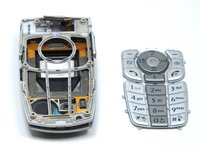
    • The back of the keypad is shown here, next to the logic board (the logic board is turned over to expose the buttons).

    Ask FixBot

    Add Comment

  10. LG L1200 Keypad Replacement: step 10, image 1 of 2 LG L1200 Keypad Replacement: step 10, image 2 of 2
    • Using a spudger, lift the keypad off of the tabs.

    Ask FixBot

    Add Comment

Conclusion

To reassemble your device, follow these instructions in reverse order.

Cancel: I did not complete this guide.

Joshua Herrmann

Member since: 04/16/10

8 Reputation

8 Guides authored

Team

Cal Poly, Team 6-14, Maness Spring 2010 Member of Cal Poly, Team 6-14, Maness Spring 2010

CPSU-MANESS-S10S6G14

4 Members

16 Guides authored

0 Guide Comments

Add Comment

View Statistics:

Past 24 Hours: 1

Past 7 Days: 15

Past 30 Days: 46

All Time: 1,392