
LG G3 Vigor Display Assembly Replacement

Zhong Zhen and 3 other contributors
Last updated on May 7, 2024
Views: 2.7K
View statistics:
- Past 24 Hours:
- 2
- Past 7 Days:
- 21
- Past 30 Days:
- 88
- All Time:
- 2,703
Comments: 2
2 guide comments.
Go to guide commentsCompleted: 6 7
6 people have marked this guide "completed." Will you be next?
7 people have marked this guide "completed." Including you — great job!
Favorites: 6 7
6 people have favorited (and subscribed to) this guide. Will you be next?
7 people have favorited (and subscribed to) this guide — including you!
Needs More Images
A few more images would make this guide's procedures crystal clear.
Featured Student Guide
This guide has been the hard work of our awesome students and is found to be exceptionally cool by the iFixit staff.
Introduction
Go to step 1 ↓Use this guide to replace the display assembly on your LG G3 Vigor.
What you need
Tools
-
Spudger4.9
-
-
-


-
-
-
-
Remove the battery by lifting from the slot at the bottom of the battery.
-
-
-
-
-
Remove the twelve Phillips #00 screws securing the midframe to the rest of the phone.
-
-
-
Work a plastic opening tool around the perimeter of the phone to separate the midframe from the rest of the phone.
-
-
-
-
-
-
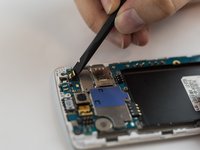
Use the spudger to gently unplug the ribbon cable connected to the motherboard. Then remove the rear facing camera.
-
-
-
-
-
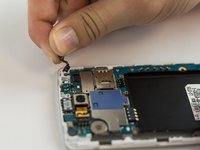
Use the spudger to gently unplug the ribbon cable connected to the motherboard.
-
Remove the front camera.
-
-
-
-
-
Use the flat edge of a spudger to disconnect the motherboard ribbon connector.
-
-
-
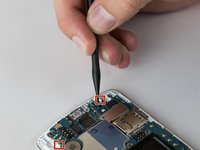
Use the pointed end of a spudger to push back the two motherboard retaining flaps.
-
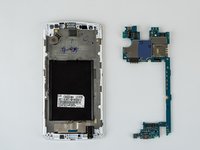
The motherboard should now be able to be lifted out of the device.
-
-
-
-
-
-
Remove the earpiece speaker with the metal spudger by prying it out.
-
-
-
-
-
Remove the headphone jack by inserting the spudger into the jack and pulling it up and out.
-
-
-
-
Tool used on this step:Tweezers$4.99
-
Using tweezers peel back the glued down ribbon cable at the bottom of the phone.
-
-
-
Using a heat gun or the iFixit iOpener tool heat up the edges of the devices screen.
-
After a few minutes heating up the edges of the screen use a metal spudger tool or any other flat tool to dig under the edge of the screen.
-
Once under the edge of the screen work your way around the entire perimeter of the screen and pull the screen off.
-
-
-
Once the screen has come off pull the ribbon cables through the hole and remove the screen completely.
-
-

 Ask FixBot






To reassemble your device, follow these instructions in reverse order.
Cancel: I did not complete this guide.
6 other people completed this guide.

Team

USF Tampa, Team 12-5, Eyestone Spring 2016 Member of USF Tampa, Team 12-5, Eyestone Spring 2016
USFT-EYESTONE-S16S12G5
4 Members
60 Guides authored
2 Guide Comments
i tried to replace the glass, the phone is now stuck at boot screen. the os would load occasionally before. possible battery/water problem. are there any hardware issue that would cause the boot screen (blinking red light)
Would anyone know a place to source the glass/lcd assembly. Mucho thanks!
