Free Shipping on Domestic Orders $75+

LG EnV VX9900 Number Keypad Replacement

What you need

  1. LG EnV VX9900 Number Keypad Replacement, Battery: step 1, image 1 of 1
    • Place the phone so the screen side is facing down.

    • Locate the latch at the end of the phone, opposite of the camera.

    Ask FixBot

    Add Comment

  2. LG EnV VX9900 Number Keypad Replacement: step 2, image 1 of 1
    • Push/pull the latch away from the camera, causing the battery to pop out.

    Ask FixBot

    Add Comment

  3. LG EnV VX9900 Number Keypad Replacement: step 3, image 1 of 1
    • Remove the battery.

    Ask FixBot

    Add Comment

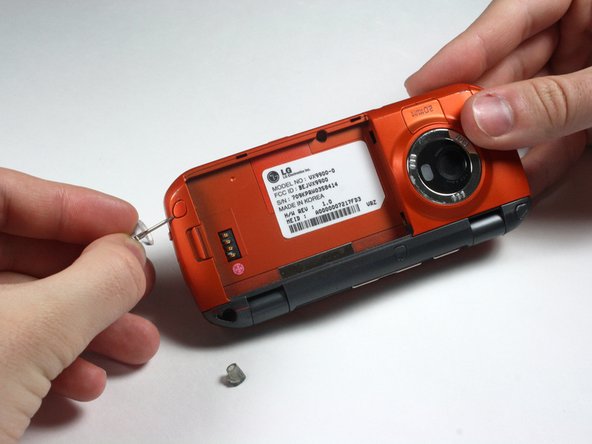
  4. LG EnV VX9900 Number Keypad Replacement, Circuit Board and Full Key Board: step 4, image 1 of 2 LG EnV VX9900 Number Keypad Replacement, Circuit Board and Full Key Board: step 4, image 2 of 2
    • Remove the 5 screw covers on the back of the phone using a Push Pin.

    Ask FixBot

    Add Comment

  5. LG EnV VX9900 Number Keypad Replacement: step 5, image 1 of 1
    • With a Phillips #00 Screwdriver, remove the five 3.44 mm screws that were under the screw covers.

    • Also with a Phillips #00 Screwdriver, remove the screw that was revealed once the battery was removed.

    Ask FixBot

    Add Comment

  6. LG EnV VX9900 Number Keypad Replacement: step 6, image 1 of 2 LG EnV VX9900 Number Keypad Replacement: step 6, image 2 of 2
    • Open the phone.

    Ask FixBot

    Add Comment

  7. LG EnV VX9900 Number Keypad Replacement: step 7, image 1 of 2 LG EnV VX9900 Number Keypad Replacement: step 7, image 2 of 2
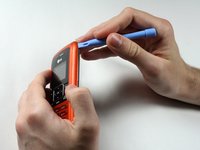
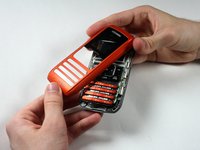
    • Starting at the card slot or charger port for greater ease, pry off the colored casing from the back of the phone using the Plastic Pry Tool (or a finger nail may work).

    • Prying open the part just to the left of the right hinge can be difficult.

    • Remove the back colored casing and set it to the side.

    Ask FixBot

    Add Comment

  8. LG EnV VX9900 Number Keypad Replacement: step 8, image 1 of 2 LG EnV VX9900 Number Keypad Replacement: step 8, image 2 of 2
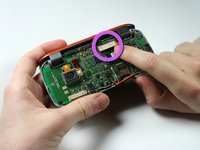
    • Gently pry and detach the connection located near the hinge with fingers.

    Ask FixBot

    Add Comment

  9. LG EnV VX9900 Number Keypad Replacement: step 9, image 1 of 2 LG EnV VX9900 Number Keypad Replacement: step 9, image 2 of 2
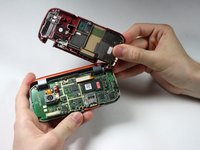
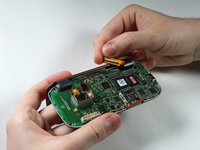
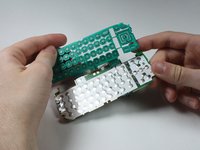
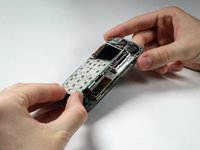
    • The circuit board and the key board will be attached, as shown in the second picture.

    • Lift them both out from the rest of the phone.

    • Do not try to the detach key board pad from the circuit board. They are replaced as a unit.

    Ask FixBot

    Add Comment

  10. LG EnV VX9900 Number Keypad Replacement, LCD Screen: step 10, image 1 of 1
    • After removing the circuit board and key board, separate the top part with the screen from the bottom part by detaching the hinges.

    Ask FixBot

    Add Comment

  11. LG EnV VX9900 Number Keypad Replacement: step 11, image 1 of 1
    • Careful! The paint is easy to scratch.

    • Remove the 4 screw covers from top piece of phone by using a Push Pin.

    Ask FixBot

    Add Comment

  12. LG EnV VX9900 Number Keypad Replacement: step 12, image 1 of 1
    • Remove the four 3.44 mm screws that were under the covers using a Phillips #00 Screwdriver.

    Ask FixBot

    Add Comment

  13. LG EnV VX9900 Number Keypad Replacement: step 13, image 1 of 3 LG EnV VX9900 Number Keypad Replacement: step 13, image 2 of 3 LG EnV VX9900 Number Keypad Replacement: step 13, image 3 of 3
    • Be careful while breaking the adhesive connecting the speaker and the casing in the following sub step so that you do not tear any wires.

    • Pry open the colored casing using the Plastic Pry Tool.

    • Remove the number pad and place it to the side.

    Ask FixBot

    Add Comment

  14. LG EnV VX9900 Number Keypad Replacement: step 14, image 1 of 2 LG EnV VX9900 Number Keypad Replacement: step 14, image 2 of 2
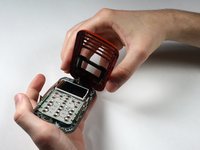
    • Because the Number Keypad is attached on one side and on top of the outer screen, open its metal casing, in a "door-opening" manner.

    Ask FixBot

    Add Comment

  15. LG EnV VX9900 Number Keypad Replacement: step 15, image 1 of 1
    • The pieces connected by wires are magnets and are removable.

    • Remove the LCD Screen.

    Ask FixBot

    Add Comment

  16. LG EnV VX9900 Number Keypad Replacement, Number Keypad: step 16, image 1 of 1
    • The Number Keypad and its metal casing are attached to the clear plastic screen that the LCD Screen was in. Replace both the Keypad and the casing as a unit.

    Ask FixBot

    Add Comment

Conclusion

To reassemble your device, follow these instructions in reverse order.

Cancel: I did not complete this guide.

One other person completed this guide.

Nathan Farnum

Member since: 04/05/12

72 Reputation

1 Guide authored

Team

Cal Poly, Team 15-15, Forte Spring 2012 Member of Cal Poly, Team 15-15, Forte Spring 2012

CPSU-FORTE-S12S15G15

5 Members

12 Guides authored

0 Guide Comments

Add Comment

View Statistics:

Past 24 Hours: 0

Past 7 Days: 3

Past 30 Days: 20

All Time: 1,387