
Kindle Paperwhite 3rd Generation Battery Replacement

Micah Smart and
Last updated on Mar 25, 2024
Views: 112K
View statistics:
- Past 24 Hours:
- 53
- Past 7 Days:
- 290
- Past 30 Days:
- 1,177
- All Time:
- 111,917
Comments: 40
17 comments on steps, 23 guide comments.
Go to guide commentsCompleted: 96 97
96 people have marked this guide "completed." Will you be next?
97 people have marked this guide "completed." Including you — great job!
Favorites: 13 14
13 people have favorited (and subscribed to) this guide. Will you be next?
14 people have favorited (and subscribed to) this guide — including you!
Featured Student Guide
This guide has been the hard work of our awesome students and is found to be exceptionally cool by the iFixit staff.
Introduction
Go to step 1 ↓Amazon’s Kindle Paperwhite 3rd Generation (7th Generation of Kindles) possesses a 3.7 Volt, Lithium Polymer battery (Model No: MC-354775-05). This guide requires that the Kindle is turned off, and that a plastic opening tool, and a PH000 screwdriver are used.
What you need
Tools


-
-
-
Gently pry the bezel off the screen using a plastic opening tool. Start at the corners and slide around the edges until you return to your starting point.
 Ask FixBot
-
-
-
Use extreme caution when prying up the bezel. Be careful not to allow your pry tool to fall underneath the display. Look under the cover as you work, separating the display from the adhesive of the bezel.
-
You want to make sure your separator goes through both sides of the bezel over top of the display.
-
The second photo is the layer you want your tool to pass through safely.
-
The third photo is an example of what can go wrong. If this happens your digitizer layer will misread touches and the display is permanently damaged.
-
-
-


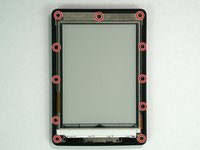
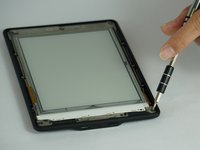


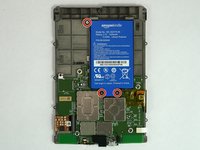
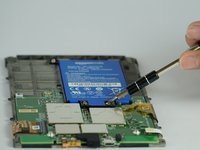

To reassemble your device, follow these instructions in reverse order.
Cancel: I did not complete this guide.
96 other people completed this guide.

Team

USF Tampa, Team 14-3, Lacy Spring 2016 Member of USF Tampa, Team 14-3, Lacy Spring 2016
USFT-LACY-S16S14G3
4 Members
36 Guides authored
23 Guide Comments
Same for 5th Generation ??
where can i buy a new battery ?
They are sold on aliexpress and ebay but the price of battery and postage is not that different from the price of a second hand 3ed Gen Kindle. But then the second hand Kindle will probably need a new battery too so, I am going to get a battery from ebay.
