
Kindle 7th Generation Back Panel Replacement

Abby Roulier and
Last updated on Jun 15, 2021
Views: 6.8K
View statistics:
- Past 24 Hours:
- 3
- Past 7 Days:
- 40
- Past 30 Days:
- 155
- All Time:
- 6,832
Comments: 10
10 comments on steps.
Completed: 4 5
4 people have marked this guide "completed." Will you be next?
5 people have marked this guide "completed." Including you — great job!
Favorites: 0 1
No one has favorited (and subscribed to) this guide. Will you be the first?
1 person has favorited (and subscribed to) this guide — and that's you!
Better Introduction
Improve this guide by completing or revising its introduction.
What you need
Tools


-
-
-
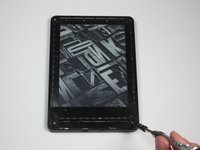
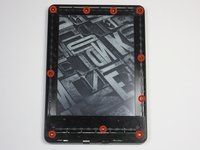
At each corner, use the blue plastic opening tool to unhook and separate the front panel from the adhesive.
-
Run the tool along the seams to pry open the front panel.
 Ask FixBot
-
-
-
Peel the front panel off to remove it from the Kindle.
-
To prevent damaging the front panel, peel the panel from the corners towards the middle of the Kindle.
-
-
-
-
-
-
Working evenly along the corners and edges, separate the internal contents from the back panel.
-



To reassemble your device, follow these instructions in reverse order.
Cancel: I did not complete this guide.
4 other people completed this guide.
Team

Cal Poly, Team 6-28, Amido Winter 2015 Member of Cal Poly, Team 6-28, Amido Winter 2015
CPSU-AMIDO-W15S6G28
4 Members
72 Guides authored
