Joy-Con Motherboard Replacement

What you need

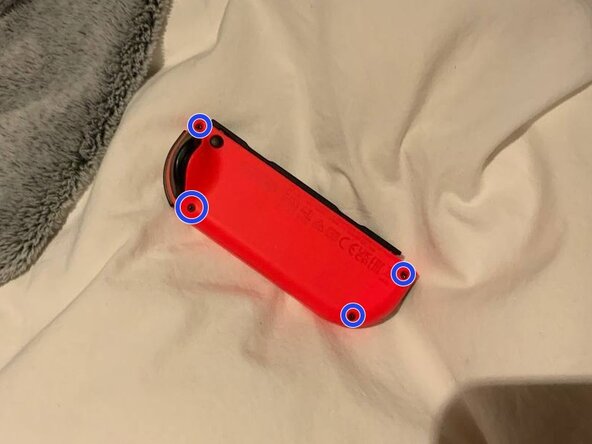
  1. Joy-Con Motherboard Replacement, Find Y00 screws: step 1, image 1 of 1
    • I'm going to use left Joy-Con. The right Joy-Con might look a bit different but the steps should be the same

  2. Joy-Con Motherboard Replacement, Unscrewing: step 2, image 1 of 2 Joy-Con Motherboard Replacement, Unscrewing: step 2, image 2 of 2
    • Take your Y00 screwdriver and get to work! Unscrew the four screws holding the back of the Joy-Con in place.

  3. Joy-Con Motherboard Replacement, Opening: step 3, image 1 of 1
    • Carefully open the Joy-Con backshell, take your time!

    • Proceed with caution. It has ribbon cables attached, BE CAREFUL!

  4. Joy-Con Motherboard Replacement, Unscrewing backshell: step 4, image 1 of 1
    • Backshell can get really annoying, so why won't we just unscrew it? Take 00 screwdriver and let's get it done!

    • Note: DO NOT unscrew bolts on an LED strip.

Conclusion

To reassemble your device, follow these instructions in reverse order.

One other person completed this guide.

Savalio AnanaNIMus

Member since: 01/01/23

61 Reputation

1 Guide authored

4 Guide Comments

This guide only stops at removing the outer screws and doesn't show the fill process. Please update.

Shannon W - Reply

this guide is horrible

parknich - Reply

这个指南,残缺品,没有什么价值

好大一个瓜 - Reply

to all the morons in the comments, the guide is marked as not finished for a reason

[deleted] - Reply

Add Comment

View Statistics:

Past 24 Hours: 0

Past 7 Days: 3

Past 30 Days: 21

All Time: 5,190