
JBL Charge Battery Replacement

Joe Durand and 14 other contributors
Last updated on Oct 19, 2026
Views: 241K
View statistics:
- Past 24 Hours:
- 15
- Past 7 Days:
- 171
- Past 30 Days:
- 557
- All Time:
- 240,997
Comments: 45
10 comments on steps, 35 guide comments.
Go to guide commentsCompleted: 40 41
40 people have marked this guide "completed." Will you be next?
41 people have marked this guide "completed." Including you — great job!
Favorites: 4 5
4 people have favorited (and subscribed to) this guide. Will you be next?
5 people have favorited (and subscribed to) this guide — including you!
Incorrect Tools
Help make this guide better by using the correct tools in images and/or text.
Introduction
Go to step 1 ↓Use this guide to replace the battery in your JBL Charge. Compare your speaker with the photos before you begin.
A worn battery may cause significantly reduced playback time. Failure to power on or poor sound quality can have other causes, so check the power supply and symptoms before replacing the battery.
Before starting, reduce the battery charge below 25% if the speaker still works and the battery shows no signs of damage. Turn off the speaker and disconnect all cables.
If the battery is swollen or damaged, do not proceed with this guide as written.
Do not puncture, bend, or crush the battery. Use a plastic spudger when working directly against the battery. The battery remains connected during the initial disassembly steps.
What you need


-
-
-
Make sure the device is powered off before you begin to disassemble the speaker.
-
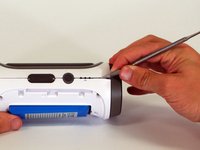
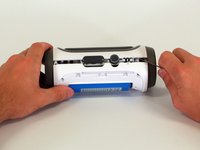
Remove the trim from the speaker using a jimmy or metal spudger.
 Ask FixBot
-
-
-
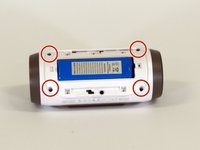
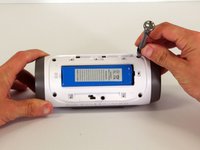
Use a Phillips #1 screwdriver to remove the five 6 mm screws securing the battery cover.
-
Remove the battery cover and set the cover aside.
-
-
-
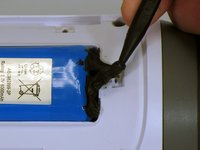
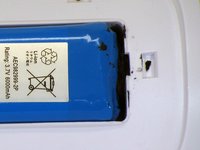
Do not puncture or bend the battery. Take care not to damage the battery cable beneath the black adhesive.
-
Use a plastic spudger to carefully loosen the black adhesive securing the battery in its compartment.
-
-
-
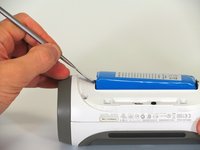
The first photo shows a metal spudger. Use a plastic spudger instead to avoid damaging the battery.
-
Use the flat end of a plastic spudger to gently lift the end of the battery opposite the cable. Lift it only far enough to access the screw underneath. Do not bend the battery or strain its cable.
-
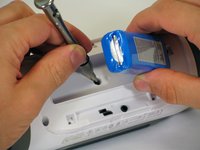
Use a Phillips #2 screwdriver to remove the 16 mm screw beneath the battery.
-
-
-
-
Use a Phillips #2 screwdriver to remove the four remaining 16 mm screws securing the white plastic housing.
-
Keep these screws separate from the shorter battery-cover screws.
-
-
-
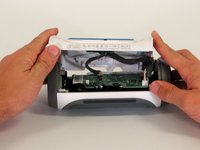
The rear housing is still connected to the speaker by cables. Do not pull the housing halves apart.
-
Starting at the corner shown in the photos, carefully insert a metal spudger into the seam between the rear housing and the speaker.
-
Work along the seam to release the adhesive. Avoid inserting the tool deeply into the speaker, where it could damage internal components.
-
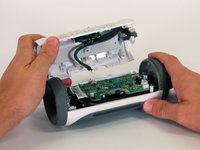
Open the rear housing only far enough to access the connectors.
-
-
-
Support the rear housing so that it does not hang from its cables.
-
Disconnect the three white connectors from the motherboard. Grip the connector housings rather than pulling on the wires. Do not force the connectors.
-
Remove the rear housing.
-
-
-
-
-
Place the rear housing on your work surface with its inner side facing up.
-
Locate the battery cable and the opening through which it passes.
-
-
-
Using a razor blade, remove the glue holding the battery cable in place.
-
Use multiple vertical cuts to remove pieces of the glue.
-
-
-
Carefully remove the foam surrounding the battery cable.
-
Do not pull on the cable or damage its insulation.
-
-
-
Carefully guide the disconnected battery connector and cable through the opening in the housing.
-
Do not force the connector through the opening or pull on the wires.
-
Remove the battery.
-
-












To reassemble your device, follow these instructions in reverse order.
Cancel: I did not complete this guide.
40 other people completed this guide.

Team

Cal Poly, Team 12-4, Lancaster Spring 2015 Member of Cal Poly, Team 12-4, Lancaster Spring 2015
CPSU-LANCASTER-S15S12G4
2 Members
48 Guides authored
35 Guide Comments
How i replaced a new battery in myjbl reflect headphone bluetooth
Please I need directions on replacing the battery of my jbl pulse speaker because it charges but doesn't indicate battery charging nor does it work.please I will be ver grateful.
Ifeanyi(kazhbone0147@gmail.com)
Your instructions state to replace the white cover, but do not say why it has to be replaced. Can you expound, please? Thank you,
Hi Delton, that is a good question. The entire cover has to be replaced if one is replacing the aux/USB ports.
You can ignore that note in this battery replacement guide. Good catch!
