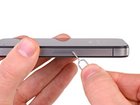
iPhone 4S SIM Card Replacement

Walter Galan and 5 other contributors
Last updated on Oct 10, 2016
Views: 188K
View statistics:
- Past 24 Hours:
- 1
- Past 7 Days:
- 24
- Past 30 Days:
- 117
- All Time:
- 188,000
Comments: 5
2 comments on steps, 3 guide comments.
Go to guide commentsCompleted: 95 96
95 people have marked this guide "completed." Will you be next?
96 people have marked this guide "completed." Including you — great job!
Favorites: 142 143
142 people have favorited (and subscribed to) this guide. Will you be next?
143 people have favorited (and subscribed to) this guide — including you!
Introduction
Go to step 1 ↓Replacing the SIM card in your iPhone 4S is easy. All you will need is an SIM card eject tool or a small paper clip. Follow this guide to replace or remove your SIM card.
What you need
Tools

-
-
-
Use a SIM card eject tool or a paperclip to eject the SIM card and its holder.
-
Remove the SIM Card tray assembly from the iPhone.
 Ask FixBot
-
-
-


To reassemble your device, follow these instructions in reverse order.
Cancel: I did not complete this guide.
95 other people completed this guide.

3 Guide Comments
This video will show you how to remove your sim card from your iPhone.
Very good - those following this guide will find they have to press surprisingly hard - so hard I thought it was likely to bust the phone. Do not be afraid!
