
IBM ThinkPad T43 Screen Replacement

aLiX pIeRRe and
Last updated on May 7, 2024
Views: 2.4K
View statistics:
- Past 24 Hours:
- 3
- Past 7 Days:
- 16
- Past 30 Days:
- 77
- All Time:
- 2,433
Comments: 0
No one has left comments on this guide. Will you be first?
Go to guide commentsCompleted: 0 1
No one has marked this guide "completed." Will you be the first?
1 person has marked this guide "completed." It's you — great job!
Favorites: 0 1
No one has favorited (and subscribed to) this guide. Will you be the first?
1 person has favorited (and subscribed to) this guide — and that's you!
Needs Better Images
Better photos will improve this guide. Help out by taking, editing, or uploading new ones!
Introduction
Go to step 1 ↓This guide shows how to take out and replace the screen in this device.
What you need
Tools


-
-
-
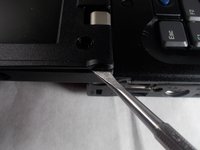
Remove the covers by inserting plastic spudger in between the edge of the cover and laptop.
-
Remove screws by using the Phillips head #0
-
-
-
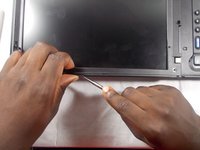
Insert the flat metal spudger into the edge of the screen cover and slowly pry open.
-
Slide the spudger along the edges and pry open to release the cover from the clips
-
While slide the spudger up the side of the cover, pinch the cover to help unhook the clips
-
-
-
Tool used on this step:Tweezers$4.99
-
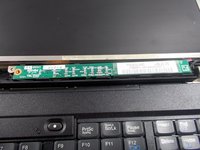
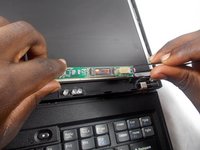
Flip over the green rectangular shaped board
-
Disconnect the screen from the rectangular board using your fingers or tweezers
-
-
-
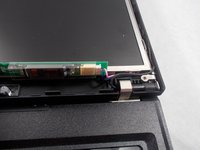
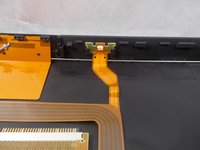
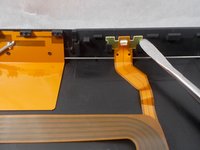
Using "Flat metal spudger" lift up the screen from the bottom slowly until you see the ribbon cable
-
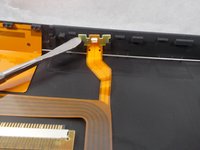
Detach the ribbon cable before lifting completely the screen
-
Now you be able to remove the screen
-
-
-
To replace the screen follow the next set of steps
-
Using your fingers or tweezers, pull out the light by placing them on the sides and lifting up
-
Insert the wide plug on the ribbon cable into the new screen and place back into the laptop.
-
Now if you follow these steps in reverse order, you will be able to finish replacing the screen
-


 Ask FixBot







To reassemble your device, follow these instructions in reverse order.

Team

UMass Dartmouth, Team S6-G4, Bernier Spring 2018 Member of UMass Dartmouth, Team S6-G4, Bernier Spring 2018
UMASSD-BERNIER-S18S6G4
4 Members
60 Guides authored
