IBM ThinkPad 380 and 385 Battery Replacement

What you need

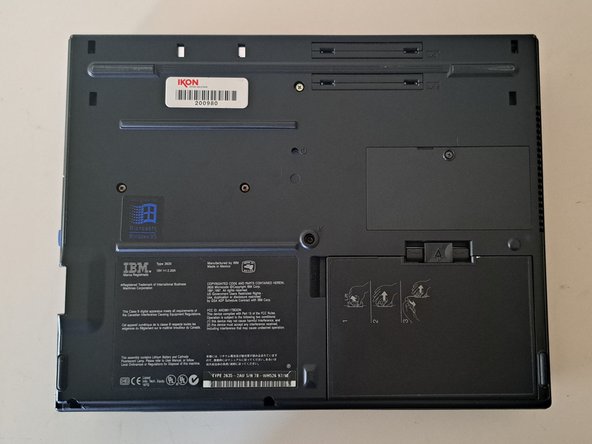
  1. IBM ThinkPad 380 and 385 Battery Replacement, Flip the ThinkPad over.: step 1, image 1 of 2 IBM ThinkPad 380 and 385 Battery Replacement, Flip the ThinkPad over.: step 1, image 2 of 2
    • Weighing in at an enormous 7 and a half pounds, this big black brick is definitely one of the thickest of the ThinkPad line.

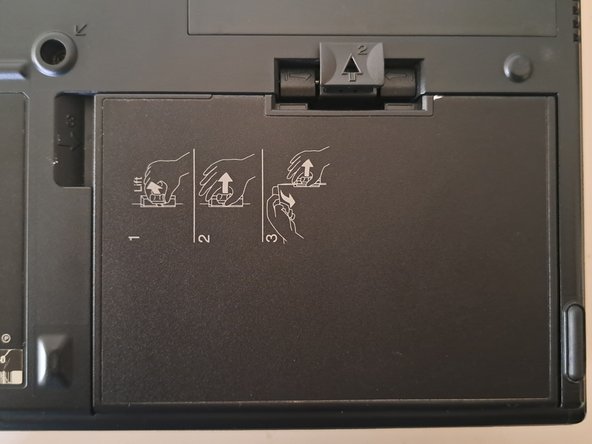
  2. IBM ThinkPad 380 and 385 Battery Replacement, The Battery Release Tab: step 2, image 1 of 2 IBM ThinkPad 380 and 385 Battery Replacement, The Battery Release Tab: step 2, image 2 of 2
    • Pull the battery tab up and forward.

    • (You can also just follow the printed instructions on the battery itself.)

  3. IBM ThinkPad 380 and 385 Battery Replacement, Pull the Battery out.: step 3, image 1 of 1
    • Pull the battery out.

    • You may have to pull quite firmly to get it to budge.

Conclusion

To reassemble your device, follow these instructions in reverse order.

Cooper Quintrall

Member since: 03/15/22

113 Reputation

1 Guide authored

0 Guide Comments

Add Comment

View Statistics:

Past 24 Hours: 0

Past 7 Days: 4

Past 30 Days: 15

All Time: 209