Free Shipping on Domestic Orders $75+

Hp Mini 2133 Hard Disk Replacement

    1. Hp Mini 2133 Hard Disk Replacement, Battery: step 1, image 1 of 3 Hp Mini 2133 Hard Disk Replacement, Battery: step 1, image 2 of 3 Hp Mini 2133 Hard Disk Replacement, Battery: step 1, image 3 of 3
      • First power off the device.

      • And remove the battery.

      Ask FixBot

      Add Comment

    2. Hp Mini 2133 Hard Disk Replacement, Remove the keyboard: step 2, image 1 of 2 Hp Mini 2133 Hard Disk Replacement, Remove the keyboard: step 2, image 2 of 2
      • Remove the screws

      • And open it up

      • Then disconect the cable for the key board.

      Ask FixBot

      Add Comment

    3. Hp Mini 2133 Hard Disk Replacement, Cable for the keyboard: step 3, image 1 of 3 Hp Mini 2133 Hard Disk Replacement, Cable for the keyboard: step 3, image 2 of 3 Hp Mini 2133 Hard Disk Replacement, Cable for the keyboard: step 3, image 3 of 3
      • Now disconect the cable under the keyboard.

      • ATTENTION There is a lever to disconect the keyboard.

      Ask FixBot

      Add Comment

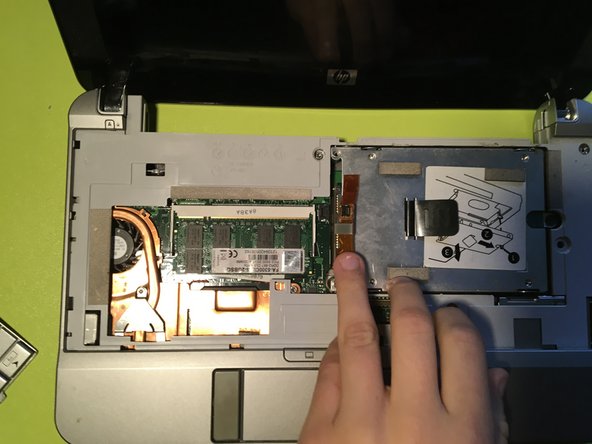
    4. Hp Mini 2133 Hard Disk Replacement, Disconect the Disk: step 4, image 1 of 2 Hp Mini 2133 Hard Disk Replacement, Disconect the Disk: step 4, image 2 of 2
      • Now you throw from the plastic.

      Ask FixBot

      Add Comment

    5. Hp Mini 2133 Hard Disk Replacement, Remove the protector: step 5, image 1 of 1
      • Now remove the protector.

      • The black screw does not come off completely.

      Ask FixBot

      Add Comment

    6. Hp Mini 2133 Hard Disk Replacement, Remove the disk: step 6, image 1 of 2 Hp Mini 2133 Hard Disk Replacement, Remove the disk: step 6, image 2 of 2
      • Now remove the disk.

      • CAUTION WITH THE CONECTOR!

      Ask FixBot

      Add Comment

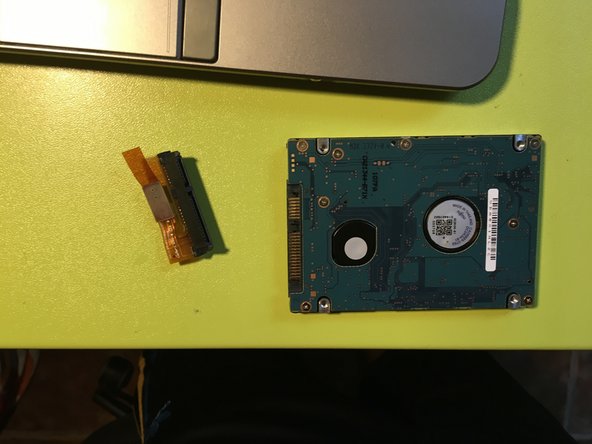
    7. Hp Mini 2133 Hard Disk Replacement, Remove the conector from the disk: step 7, image 1 of 2 Hp Mini 2133 Hard Disk Replacement, Remove the conector from the disk: step 7, image 2 of 2
      • Now you remove the conector from the disk.

      • CAUTION WITH THE CONECTOR!

      Ask FixBot

      Add Comment

Conclusion

Para reensamblar tu dispositivo, sigue estas instrucciones en orden inverso.

Cancel: I did not complete this guide.

One other person completed this guide.

Guzmini

Member since: 10/24/23

145 Reputation

1 Guide authored

0 Guide Comments

Add Comment

View Statistics:

Past 24 Hours: 1

Past 7 Days: 11

Past 30 Days: 62

All Time: 799