
How to clean the HP PSC 2410 Photosmart All In One Printer callibration strip

Jeremy Mahrt and
Last updated on Jul 1, 2024
Views: 12K
View statistics:
- Past 24 Hours:
- 3
- Past 7 Days:
- 26
- Past 30 Days:
- 97
- All Time:
- 11,605
Comments: 2
2 guide comments.
Go to guide commentsCompleted: 8 9
8 people have marked this guide "completed." Will you be next?
9 people have marked this guide "completed." Including you — great job!
Favorites: 2 3
2 people have favorited (and subscribed to) this guide. Will you be next?
3 people have favorited (and subscribed to) this guide — including you!
Action Shots
Be an action hero! This guide needs images that better demonstrate how to perform specific actions.
Introduction
Go to step 1 ↓If your scanner is making a clicking/grinding noise and malfunctioning, chances are your calibration strip is dirty. In order to clean the calibration strip, the scanner tray and glass must be removed.
What you need
Tools


-
-
-
Carefully wedge the flathead 3/32" screwdriver on the outer groove of the control panel faceplate.
-
Follow the perimeter of the groove with the flathead 3/32" screwdriver making sure to gently pry and lift upward until the control panel faceplate comes off.
 Ask FixBot
-
-
-
Once the control panel faceplate is off, look for the Lock/Unlock tab located underneath the off button.
-
To unlock and release the control panel, insert the flathead 3/32" screwdriver into the tab and carefully push down. The control panel will then separate from the printer's base by sliding it downward a little.
-
-
-
Underneath the control panel will be a flat grey ribbon cable. This cable is attached at the base of the green control board with the other end of the cable located on the back side of the printer's base.
-
Carefully disconnect both ends of the flat grey ribbon cable to release the control panel in its entirety.
-
-
-
-
Lift open the scanner lid and locate a black tab located at the center of the scanner bed.
-
Using your finger push (pull on some printers) the tab towards the scanner lid. This will release the scanner lid
-
-
-
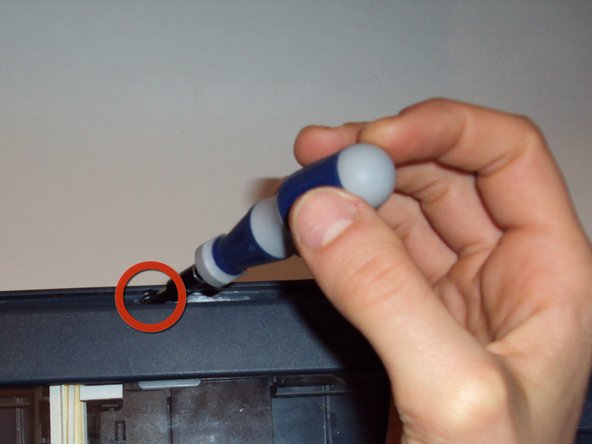
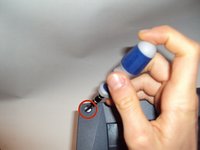
Once the scanner lid is removed, use the Philips #1(Torx on some printers) Screwdriver to remove the screw.
-
-
-
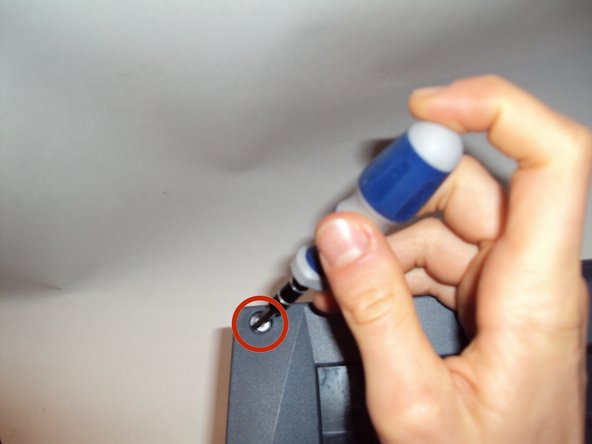
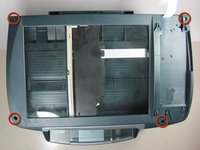
Remove all four silver screws from the corners of the scanner glass cover with a T10 Torx Screwdriver.
-
-
-
Once you have removed the four torx screws, gently lift the scanner glass cover from the printer's base.
-
-
-
-
-
Turn the scanner glass over and place it on a clean surface.
-
Moisten a lint-free cloth with alcohol and gently wipe down the calibration strip.
-
-





To reassemble your device, follow these instructions in reverse order.
Cancel: I did not complete this guide.
8 other people completed this guide.

Team

Cal Poly, Team 12-31, Maness Spring 2011 Member of Cal Poly, Team 12-31, Maness Spring 2011
CPSU-MANESS-S11S12G31
5 Members
108 Guides authored
2 Guide Comments
Thank you for this guide! My printer scan head was clicking and grinding at startup and would not allow me to print.
In addition to cleaning the glass and calibration strip, I manually slid the scanner head back and forth through its full range of motion. Once the printer was reassembled, the grinding ceased and all operations are back to normal.
Yes, great advice!
And the step by step guide is really of vital help! Just taking the dust flocks out and carefully cleaning the parts w/ a small brush or ear tips and akcohol saved my 12 yr old printer! I'm soooo greatful to you all for helping us keep our hardware goods for a long time to come!
