How to clean Lite-On LightScribe SHM-165H6S lens

aaa and
Last updated on Feb 19, 2016
Views: 6.6K
View statistics:
- Past 24 Hours:
- 3
- Past 7 Days:
- 24
- Past 30 Days:
- 90
- All Time:
- 6,592
Comments: 1
1 guide comment.
Go to guide commentsCompleted: 5 6
5 people have marked this guide "completed." Will you be next?
6 people have marked this guide "completed." Including you — great job!
Favorites: 9 10
9 people have favorited (and subscribed to) this guide. Will you be next?
10 people have favorited (and subscribed to) this guide — including you!
Featured Guide
This guide has been found to be exceptionally cool by the iFixit staff.
Action Shots
Be an action hero! This guide needs images that better demonstrate how to perform specific actions.
Bullets!
Better coordination with markups and the color/type of bullets will help make this guide more clear!
Community-Contributed Guide
An awesome member of our community made this guide. It was not created by iFixit staff.
Introduction
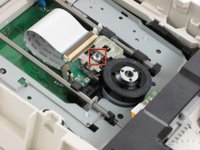
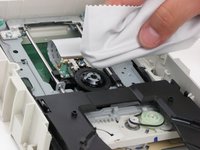
Go to step 1 ↓If your drive is having problems reading or writing a disk, dust may have collected on the lens, which will need to be cleaned.
What you need
Tools


-
-
-
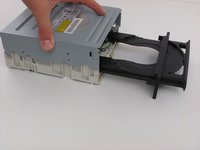
Insert an open paper clip into the small hole on the left side of the faceplate.
-
After the tray opens, extend it fully.
 Ask FixBot
-
-
-
Use an opening device to push in the black tabs on the left, right and bottom of the outer chassis to unhook the faceplate.
-
-
-
-
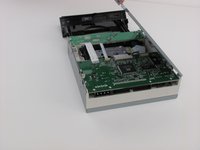
Unscrew the four 8.5 mm screws on the bottom chassis using a Philips #2 screwdriver.
-
-
-




To reassemble your device, follow these instructions in reverse order.
Cancel: I did not complete this guide.
5 other people completed this guide.