Free Shipping on Domestic Orders $75+

How to Reconnect an Alligator Clamp to a Battery Charging Cable

What you need

  1. How to Reconnect an Alligator Clamp to a Battery Charging Cable, How to Reconnect an Alligator Clamp to a Battery Charging Cable: step 1, image 1 of 2 How to Reconnect an Alligator Clamp to a Battery Charging Cable, How to Reconnect an Alligator Clamp to a Battery Charging Cable: step 1, image 2 of 2
    • Determine which handle of the alligator clamp originally secured the charging cable. (The tabs will be pressed down and there will most likely be remnants of copper strands)

    • Slide the rubber grip off of the handle which did NOT originally secure the charging cable.

    Ask FixBot

    Add Comment

  2. How to Reconnect an Alligator Clamp to a Battery Charging Cable: step 2, image 1 of 1
    • If you use a knife, be wary of slicing your thumb if the sharp edge is faced towards you. (Use Wire Strippers if you have them)

    • Remove about an inch of insulation from the cable using a knife, a razor blade, or wire strippers.

    Ask FixBot

    Add Comment

  3. How to Reconnect an Alligator Clamp to a Battery Charging Cable: step 3, image 1 of 1
    • Clip the excess frayed copper strands from the cable using the wire cutters.

    Ask FixBot

    Add Comment

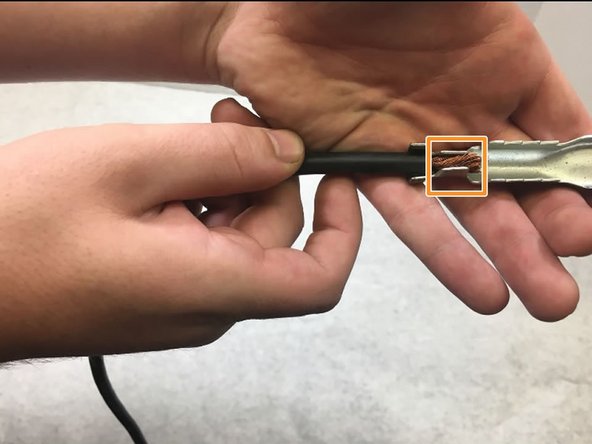
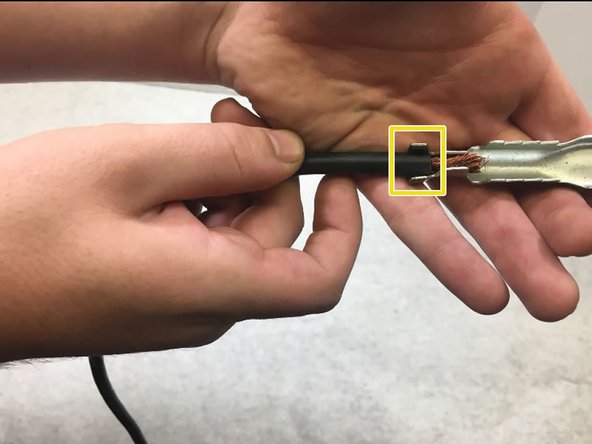
  4. How to Reconnect an Alligator Clamp to a Battery Charging Cable: step 4, image 1 of 3 How to Reconnect an Alligator Clamp to a Battery Charging Cable: step 4, image 2 of 3 How to Reconnect an Alligator Clamp to a Battery Charging Cable: step 4, image 3 of 3
    • Slide the rubber grip over the wire. You may not be able to to so after the wire is crimped.

    • Place the cable in the unused side of the alligator clamp.

    • Place the exposed copper strands in between these two tabs.

    • Make sure that the insulation covers the full area between these two tabs.

    Ask FixBot

    Add Comment

  5. How to Reconnect an Alligator Clamp to a Battery Charging Cable: step 5, image 1 of 1
    • The harder the tabs are pressed onto the cable, the more secure the connection will be.

    • Use the vice grips to press down all four tabs onto the cable.

    Ask FixBot

    Add Comment

  6. How to Reconnect an Alligator Clamp to a Battery Charging Cable: step 6, image 1 of 1
    • Slide the rubber grip back onto the handle.

    Ask FixBot

    Add Comment

Conclusion

Now plug in the Battery Charger to test for continuity from the cable to the clamp, by charging a battery.

Cancel: I did not complete this guide.

Derek Moore

Member since: 10/06/16

111 Reputation

1 Guide authored

0 Guide Comments

Add Comment

View Statistics:

Past 24 Hours: 0

Past 7 Days: 14

Past 30 Days: 55

All Time: 4,800