
Toshiba Satellite A205-S4577 Speaker Cover Replacement

Daniel Johnson and 7 other contributors
Last updated on Oct 15, 2018
Views: 1.9K
View statistics:
- Past 24 Hours:
- 3
- Past 7 Days:
- 14
- Past 30 Days:
- 82
- All Time:
- 1,928
Comments: 0
No one has left comments on this guide. Will you be first?
Go to guide commentsCompleted: 0 1
No one has marked this guide "completed." Will you be the first?
1 person has marked this guide "completed." It's you — great job!
Favorites: 0 1
No one has favorited (and subscribed to) this guide. Will you be the first?
1 person has favorited (and subscribed to) this guide — and that's you!
Introduction
Go to step 1 ↓The speaker cover, located above the keyboard, can be removed by following these simple steps.
What you need
Tools

-
-
-
Locate the two sliding locks indicated in the photo.
-
Slide the right lock (labeled "1") to the right. It will remain in the unlocked position.
-
Slide the left lock (labeled "2") to the left and hold it in place.
 Ask FixBot
-
-
-
While holding the left lock, place your finger in the indentation next to the battery and lift the battery out.
-
-
-
-
-
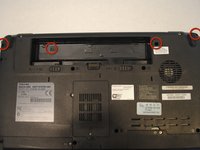
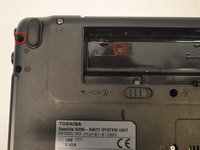
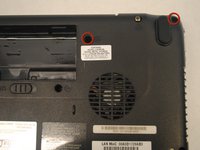
Remove the four screws indicated in the photos using a Phillips 00 Screwdriver. Left to right: 6mm button-head, 3mm flat-head, 6mm button-head, 6mm button-head.
-
-
-
With your hands, grasp the speaker cover on the edge nearest to the screen.
-
Pry the speaker cover upward.
-
-
-
-
Remove the speaker cover. Your laptop will look like this photo when the speaker cover has been removed.
-
-




To reassemble your device, follow these instructions in reverse order.

Team

Cal Poly, Team 17-6, Regan Spring 2013 Member of Cal Poly, Team 17-6, Regan Spring 2013
CPSU-REGAN-S13S17G6
5 Members
132 Guides authored
