
JBL Clip 3 Carabiner Clip Replacement

Tyler Molden and 7 other contributors
Last updated on Dec 6, 2022
Views: 6.9K
View statistics:
- Past 24 Hours:
- 6
- Past 7 Days:
- 45
- Past 30 Days:
- 160
- All Time:
- 6,883
Comments: 6
6 comments on steps.
Completed: 2 3
2 people have marked this guide "completed." Will you be next?
3 people have marked this guide "completed." Including you — great job!
Favorites: 0 1
No one has favorited (and subscribed to) this guide. Will you be the first?
1 person has favorited (and subscribed to) this guide — and that's you!
Introduction
Go to step 1 ↓If your JBL Clip 3 clip mechanism is no longer functioning, or has broken, the carabiner clip may require replacement.
This guide will show you the step by step process of replacing a carabiner clip for a JBL Clip 3. The process won’t be too difficult, requiring no special skills. Make sure to be careful when removing parts, because they can be fragile.
What you need
Tools
-
-
Tweezers4.9


-
-
-
Insert the iFixit opening tool between the speaker grill and speaker housing and pry around the entire perimeter of the device until the grill releases.
 Ask FixBot
-
-
-
-
-
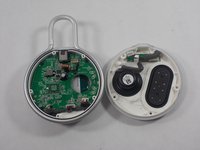
Use a Phillips #1 screwdriver to remove the five 6.3 mm screws around the perimeter.
-
-
Tool used on this step:Tweezers$4.99
-
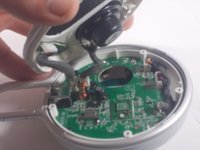
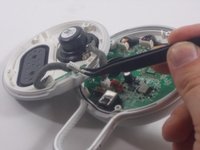
Use tweezers to remove the 2 pin and 4 pin connectors from the motherboard.
-
-
-
-




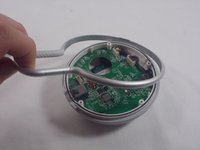
To reassemble your device, follow these instructions in reverse order.
Cancel: I did not complete this guide.
2 other people completed this guide.

Team

UMass Dartmouth, Team 1-5, Petersen Spring 2022 Member of UMass Dartmouth, Team 1-5, Petersen Spring 2022
UMASSD-PETERSEN-S22S1G5
3 Members
72 Guides authored
