Free Shipping on Domestic Orders $75+

Huawei P20 Pro Back Glass Replacement

Archived Guide
This guide is retained solely for historical purposes. Use the updated version of the guide to perform your repair.

What you need

  1. Huawei P20 Pro Back Glass Replacement, Back Glass: step 1, image 1 of 1
    • Put your phone on a clean work surface with good lighting.

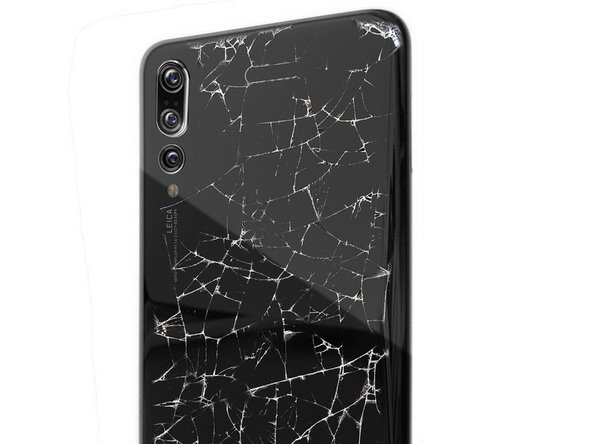
    • If your back glass is shattered use clear tape to tape over the shattered glass. Use safety glasses to prevent your eyes from glass shards.

    Ask FixBot
  2. Huawei P20 Pro Back Glass Replacement: step 2, image 1 of 1
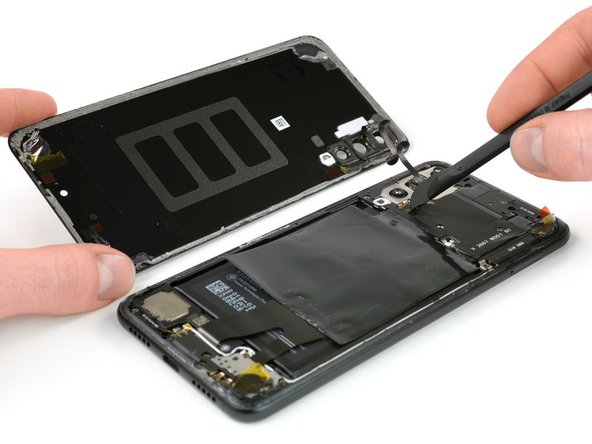
    • Gently but firmly insert a thin iSesamo tool about an inch between the broken back glass and the frame.

    • Do not insert the iSeasmo by the camera! There is a cable by the camera that may be cut if you insert the iSeasmo there!

    • Slice all the way around the phone's edges to cut all of the adhesive.

    • Do not slice around the camera area! There is a cable by the camera that may be cut if you slice around there with the iSeasmo.

    • It is also possible to slightly heat the area with a hair dryer to loosen tough adhesive.

    Ask FixBot
  3. Huawei P20 Pro Back Glass Replacement: step 3, image 1 of 1
    • Open the phone like a book and set the rear glass assembly aside.

    • Disconnect the fingerprint sensor.

    • Put down some 4 mm Tesa tape to act as replacement adhesive before reassembling your device.

    • Remove the fingerprint sensor from the broken/scratched back glass and reconnect the fingerprint sensor pad to your new back glass before closing the device.

    Ask FixBot
  4. Huawei P20 Pro Back Glass Replacement: step 4, image 1 of 1
    • Apply your new back glass assembly onto your phone. Apply some light force onto the back of the phone so that the adhesive sets.

    Ask FixBot
Conclusion

Congratulations! You have replaced the back glass of your Huawei P20. Clean with a microfiber cloth for a perfect finish without scratches or fingerprints.

5 other people completed this guide.

Special thanks to these translators:

fr en

100%

[deleted] is helping us fix the world! Want to contribute?
Start translating ›

cPix

Member since: 06/14/16

4,194 Reputation

8 Guides authored

4 Guide Comments

Would the phone still be waterproof after?

Cameron Rogers - Reply Share

No the phone is no more waterproof. It’s mitigated by the fact that after a few month your phone’s water protection is probably already compromised du to wear.

David S. - Reply Share

How much and where can i replace mine?

nyamakazithembelani - Reply Share

ou trouver les differents composants a acheter pour realiser cette reparation?

renzo11 - Reply Share

Add Comment

View Statistics:

Past 24 Hours: 1

Past 7 Days: 5

Past 30 Days: 34

All Time: 9,301