
How To Open A Desktop Hard Drive

gamer_Kat and one other contributor
Last updated on Jan 9, 2024
Views: 2.9K
View statistics:
- Past 24 Hours:
- 7
- Past 7 Days:
- 57
- Past 30 Days:
- 202
- All Time:
- 2,851
Comments: 0
No one has left comments on this guide. Will you be first?
Go to guide commentsCompleted: 13 14
13 people have marked this guide "completed." Will you be next?
14 people have marked this guide "completed." Including you — great job!
Favorites: 0 1
No one has favorited (and subscribed to) this guide. Will you be the first?
1 person has favorited (and subscribed to) this guide — and that's you!
Community-Contributed Guide
An awesome member of our community made this guide. It was not created by iFixit staff.
Introduction
Go to step 1 ↓Have you ever wanted to open up an old hard drive? Whether it's to permanently delete your data or to better understand how a disk drive works, I'm going to be showing you how to do it yourself. Note: Doing this is not reversible and can damage your hard drive. I am doing this on a junk hard drive, take caution when you do it yourself.
What you need
Tools

-
-
-
Use a size 8 Torx screwdriver to remove the front screws. The location and amount may vary depending on your drive, but they are very easy to locate.
 Ask FixBot
-
-
-
There may be a screw hidden under the front sticker, so make sure to peel it off and check before you open it up. Use a spudger to peel off any material in the way of the screw
-
-
-
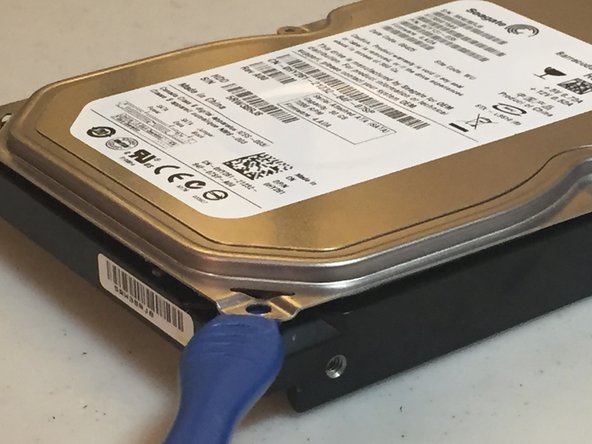
Slide a spudger around the front cover to remove any adhesive or rubber insulation before opening.
-
-
-
-
There you have it! Now you have a fully-opened hard drive. Whether you want to make a pretty cool (and large) paperweight or perma-delete your data, you can now do so.
-
-




This is not a reversible process. I am not responsible for any damage done to you or your hard drive while opening it.
Cancel: I did not complete this guide.
13 other people completed this guide.

