This translation was generated by a machine and has not been reviewed by a person yet. Speak this language? Review it.
What you need
-
-
-
Before opening the device, be sure to remove the SIM card tray.
-
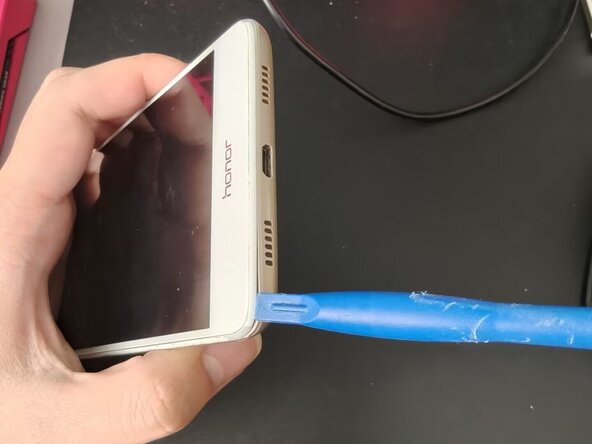
Insert a spudger, opening pick, or any thin card into one of the four corners and slide it along the edge of the rear cover. Be careful not to insert it too deeply, as there are ribbon cables inside.
-
Do not use excessive force, as this can damage the clips and prevent the rear cover from closing properly. Additionally, the fingerprint sensor is connected to the rear cover.
 Ask FixBot
-
-
-
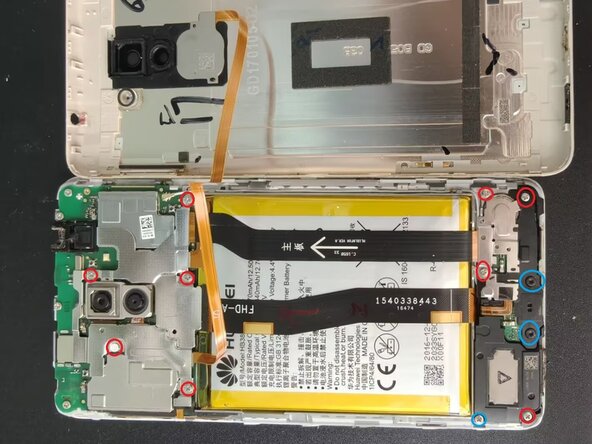
10 PH0 screws (red), 2 T5 screws (blue)
-
To replace the battery, you only need to remove the top 5 screws. If the middle cable is in your way, you can choose to remove the 3 screws in the red circles on the lower right and the two screws in the blue circles.
-
-
-
-
The flex cable for the upper motherboard shield and the camera are adhered together; use extra care when removing it.
-
It is recommended to use a plastic tool to disconnect the flex cable from the motherboard to avoid unnecessary damage.
-
-
-
Insert a plastic card at the red circle. Do not use a metal card or any object with sharp edges.
-
Once inserted, wiggle the card from side to side and push it in. You can try to lift the battery when appropriate.
-
-
-
To finish, install the new battery, snap the motherboard cover back into place, and reinstall the screws and the back cover.
-
-




To reassemble your device, follow the instructions in reverse order.
Cancel: I did not complete this guide.
One other person completed this guide.

