Free Shipping on Domestic Orders $75+

Holmes Box Fan Cleaning

What you need

  1. Holmes Box Fan Cleaning, Identifying Parts: step 1, image 1 of 2 Holmes Box Fan Cleaning, Identifying Parts: step 1, image 2 of 2
    • Front frame

    • Red arrow: Blade

    • Green arrow: Main Frame

    • Back frame

    • Blue arrow: Motor

    • Orange boxes: Stands

  2. Holmes Box Fan Cleaning, Disassembly of Front Frame: step 2, image 1 of 2 Holmes Box Fan Cleaning, Disassembly of Front Frame: step 2, image 2 of 2
    • Locate and remove all 6 screws on front side with a screwdriver

    • Set screws aside so they are not lost

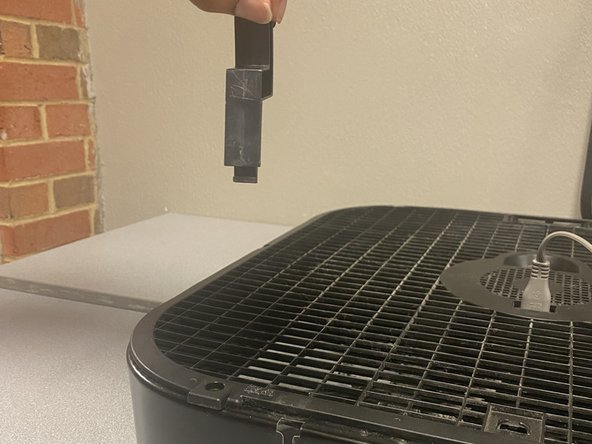
  3. Holmes Box Fan Cleaning, Removal of Stands: step 3, image 1 of 3 Holmes Box Fan Cleaning, Removal of Stands: step 3, image 2 of 3 Holmes Box Fan Cleaning, Removal of Stands: step 3, image 3 of 3
    • Lift and pull up to remove stands

    • Be careful not to break stands when removing

  4. Holmes Box Fan Cleaning, Disassembly of Back Frame: step 4, image 1 of 3 Holmes Box Fan Cleaning, Disassembly of Back Frame: step 4, image 2 of 3 Holmes Box Fan Cleaning, Disassembly of Back Frame: step 4, image 3 of 3
    • Locate and remove all 6 screws on the back side with a screwdriver

    • Set screws aside so they are not lost

    • When removing the back frame, the power cord can stay attached to the motor

  5. Holmes Box Fan Cleaning, Removal of Main Frame: step 5, image 1 of 2 Holmes Box Fan Cleaning, Removal of Main Frame: step 5, image 2 of 2
    • Locate and remove the 4 screws on the back side of the main frame

    • Remove the main frame from the motor

    • Set screws aside so they are not lost

    • Do not damage the power cord during removal (if still attached)

  6. Holmes Box Fan Cleaning, Cleaning the Blades: step 6, image 1 of 2 Holmes Box Fan Cleaning, Cleaning the Blades: step 6, image 2 of 2
    • Carefully clean the blades using a paper towel or cloth

  7. Holmes Box Fan Cleaning, Cleaning the Motor: step 7, image 1 of 2 Holmes Box Fan Cleaning, Cleaning the Motor: step 7, image 2 of 2
    • Carefully clean the motor using a paper towel or cloth

    • A cotton swab can be used for the smaller areas that are hard to reach

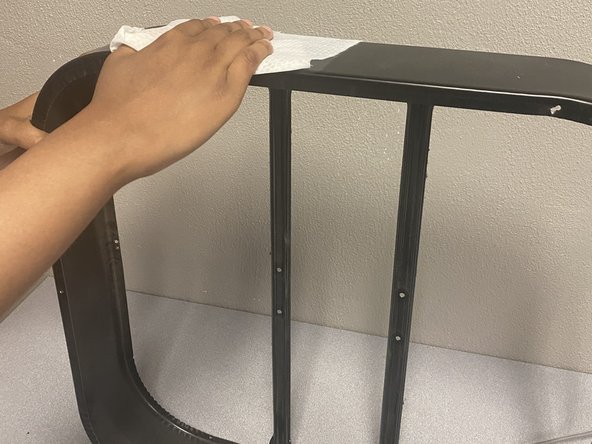
  8. Holmes Box Fan Cleaning, Cleaning the Front & Back Frames: step 8, image 1 of 1
    • Clean the frames with a paper towel or cloth and then use a cotton swab to thoroughly clean the grids

    • This step may seem tedious, so patience is key

  9. Holmes Box Fan Cleaning, Disinfecting (Optional): step 9, image 1 of 2 Holmes Box Fan Cleaning, Disinfecting (Optional): step 9, image 2 of 2
    • A Clorox wipe can be used to disinfect the blades, main frame, and exterior of the motor

    • This step is optional depending on how thoroughly the fan needs to be cleaned

    • All parts should be dry before reassembly

Conclusion

To reassemble your device, follow the disassembly instructions in reverse order.

Taryn Lema

Member since: 06/28/21

169 Reputation

1 Guide authored

0 Guide Comments

Add Comment

View Statistics:

Past 24 Hours: 4

Past 7 Days: 13

Past 30 Days: 31

All Time: 2,518