Free Shipping on Domestic Orders $75+

Headset Battery Disconnection

Prerequisite Only
This is a prerequisite-only guide! This guide is part of another procedure and isn’t meant to be used alone.
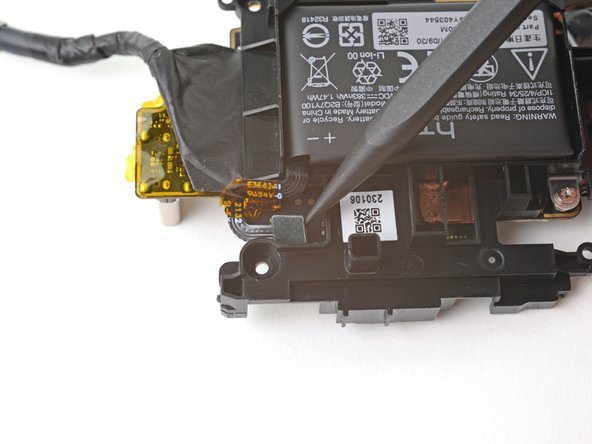
  1. Headset Battery Disconnection, Disconnect the battery: step 1, image 1 of 2 Headset Battery Disconnection, Disconnect the battery: step 1, image 2 of 2
    • Flip the motherboard assembly over so the fan is facing upward.

    • Use the point of a spudger to pry up and disconnect the headset battery press connector.

Conclusion

To reassemble your device, follow these instructions in reverse order.

Alex Diaz-Kokaisl

Member since: 01/16/22

218,400 Reputation

1,087 Guides authored

Team

iFixit Member of iFixit

Staff

125 Members

24,012 Guides authored

0 Guide Comments

Add Comment

View Statistics:

Past 24 Hours: 0

Past 7 Days: 1

Past 30 Days: 2

All Time: 37