15% Off Selected iFixit Tools — Limited Time
Free Shipping on Domestic Orders $75+

Hamilton Beach 51101BA Power Button Replacement

What you need

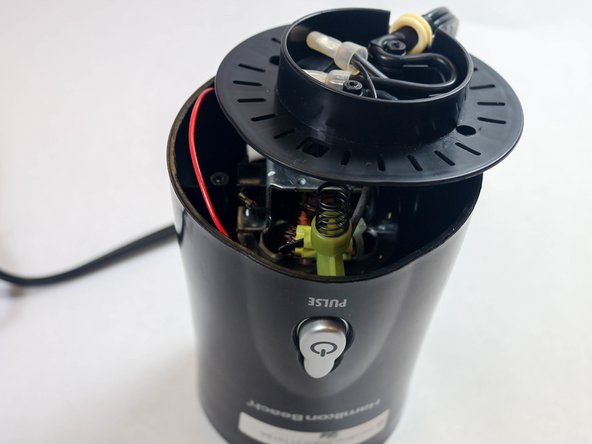
  1. Hamilton Beach 51101BA Power Button Replacement, Power Button: step 1, image 1 of 3 Hamilton Beach 51101BA Power Button Replacement, Power Button: step 1, image 2 of 3 Hamilton Beach 51101BA Power Button Replacement, Power Button: step 1, image 3 of 3
    • Remove the container from the base.

    • Hold the blender and the container, then twist the container in a clockwise motion.

    • Make sure to follow the lock and unlock markings on the container.

    Ask FixBot

    Add Comment

  2. Hamilton Beach 51101BA Power Button Replacement: step 2, image 1 of 1
    • Turn the blender so the bottom is facing you.

    • Using a Phillips #2 screwdriver, remove the two 5 mm Phillips screws from the base.

    Ask FixBot

    Add Comment

  3. Hamilton Beach 51101BA Power Button Replacement: step 3, image 1 of 1
    • Using a Phillips #2 screwdriver, remove the two 5 mm Phillips screws from the motor platform.

    Ask FixBot

    Add Comment

  4. Hamilton Beach 51101BA Power Button Replacement: step 4, image 1 of 2 Hamilton Beach 51101BA Power Button Replacement: step 4, image 2 of 2
    • Unhinge the motor platform from the blender.

    • You may need a plastic spudger to unhinge the plastic bottom piece from the base of the blender.

    • You do not need to completely remove this piece from the base.

    Ask FixBot

    Add Comment

  5. Hamilton Beach 51101BA Power Button Replacement: step 5, image 1 of 1
    • Pull out the rectangular green piece.

    • This is the actual power button.

    Ask FixBot

    Add Comment

  6. Hamilton Beach 51101BA Power Button Replacement: step 6, image 1 of 1
    • Some experience in soldering is required!

    • On the back of the power button, desolder the red and grey wires that are connected to the piece.

    Ask FixBot

    Add Comment

Conclusion

To reassemble your device, follow these instructions in reverse order.

Cancel: I did not complete this guide.

2 other people completed this guide.

Brandon Nunez

Member since: 08/28/15

301 Reputation

2 Guides authored

Team

USF Tampa, Team 2-5, Sullivan Fall 2015 Member of USF Tampa, Team 2-5, Sullivan Fall 2015

USFT-SULLIVAN-F15S2G5

4 Members

6 Guides authored

0 Guide Comments

Add Comment

View Statistics:

Past 24 Hours: 0

Past 7 Days: 7

Past 30 Days: 24

All Time: 3,993