Shop the Holiday Gift Guide
Free Shipping on Domestic Orders $75+

PlayStation 3 Motherboard Assembly Replacement

Views: 2.6K

View statistics:

Past 24 Hours:
0
Past 7 Days:
7
Past 30 Days:
14
All Time:
2,634
Comments: 10

10 comments on steps.

Completed: 0

No one has marked this guide "completed." Will you be the first?

Favorites: 0

No one has favorited (and subscribed to) this guide. Will you be the first?

Time Required: No estimate
Difficulty: Moderate
PlayStation 3 Motherboard Assembly Replacement
Prerequisite Only This is a prerequisite-only guide! This guide is part of another procedure and isn’t meant to be used alone.

What you need

Tools

    1. PlayStation 3 Motherboard Assembly Replacement, Motherboard Assembly: step 1, image 1 of 1
      • Pull the control board ribbon cable straight up and out of its socket on the motherboard.

      Ask FixBot

      Add Comment

    2. PlayStation 3 Motherboard Assembly Replacement: step 2, image 1 of 2 PlayStation 3 Motherboard Assembly Replacement: step 2, image 2 of 2
      • Remove the two 12 mm Phillips screws securing the control board to the lower case.

      • Remove the control board and its attached cable from the PS3.

      Ask FixBot

      Add Comment

    3. PlayStation 3 Motherboard Assembly Replacement: step 3, image 1 of 1
      • Remove the following eight screws securing the motherboard assembly to the lower case:

      • Seven 12 mm Phillips screws (ph2)

      • One 30 mm Phillips screw

      Ask FixBot

      Add Comment

    4. PlayStation 3 Motherboard Assembly Replacement: step 4, image 1 of 1
      • Remove the control board bracket.

      Ask FixBot

      Add Comment

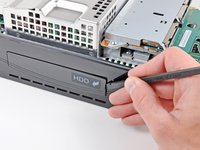
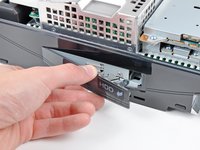
    5. PlayStation 3 Motherboard Assembly Replacement: step 5, image 1 of 2 PlayStation 3 Motherboard Assembly Replacement: step 5, image 2 of 2
      • Use the flat end of a spudger to pry the hard drive bay cover away from the lower case.

      • Remove the hard drive bay cover.

      Ask FixBot

      Add Comment

    6. PlayStation 3 Motherboard Assembly Replacement: step 6, image 1 of 1
      • Lift the motherboard assembly out of the lower case.

      Ask FixBot

      Add Comment

Conclusion

To reassemble your device, follow these instructions in reverse order.

Cancel: I did not complete this guide.

Author

with

Walter Galan

711,864 Reputation

1,203 Guides authored

0 Guide Comments

Add Comment

View Statistics:

Past 24 Hours: 0

Past 7 Days: 7

Past 30 Days: 14

All Time: 2,634