15% Off Selected iFixit Tools — Limited Time
Free Shipping on Domestic Orders $75+

HP Touchsmart IQ506 RAM (Memory) Replacement

What you need

  1. HP Touchsmart IQ506 RAM (Memory) Replacement, Change note: step 1, image 1 of 2 HP Touchsmart IQ506 RAM (Memory) Replacement, Change note: step 1, image 2 of 2
    Tool used on this step:
    Essential Electronics Toolkit
    $25.46
    Buy
    • Due to the EET missing several components present in the Pro Tech Go and only being $20 cheaper, the EET has been removed. The EET will work for this guide as-is, but if you are shopping for a new toolkit to complete this guide, the Pro Tech Go (new or refurbished, refurbished is ~$32 cheaper), or Pro Tech ($79 new/~$59.95 refurb) is the current recommended toolkit for this guide.

    • If you are interested in a refurbished kit stock levels change frequently but can be found here.

    Ask FixBot

    Add Comment

  2. HP Touchsmart IQ506 RAM (Memory) Replacement, Unplug the system: step 2, image 1 of 2 HP Touchsmart IQ506 RAM (Memory) Replacement, Unplug the system: step 2, image 2 of 2
    • Unplug the power brick from the system.

    Ask FixBot

    Add Comment

  3. HP Touchsmart IQ506 RAM (Memory) Replacement, Remove the RAM door: step 3, image 1 of 3 HP Touchsmart IQ506 RAM (Memory) Replacement, Remove the RAM door: step 3, image 2 of 3 HP Touchsmart IQ506 RAM (Memory) Replacement, Remove the RAM door: step 3, image 3 of 3
    • Unscrew the RAM door using a Phillips #1 screwdriver. Snap the RAM door off from the bottom and slide it off.

    Ask FixBot

    Add Comment

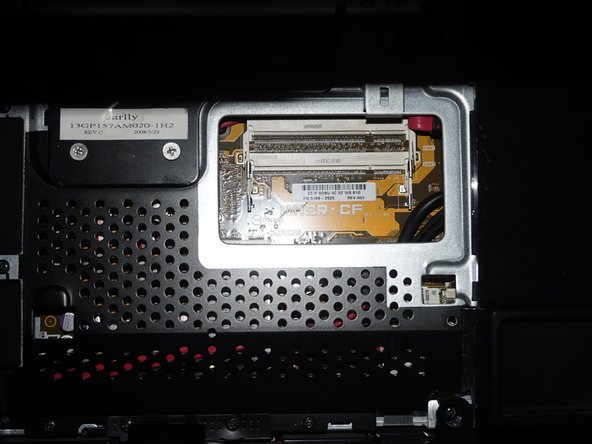
  4. HP Touchsmart IQ506 RAM (Memory) Replacement, Remove the RAM: step 4, image 1 of 2 HP Touchsmart IQ506 RAM (Memory) Replacement, Remove the RAM: step 4, image 2 of 2
    • With the RAM exposed, remove the RAM from the slots on the system by pushing the tabs back. Once you do this the RAM will pop up and you can remove it.

    • Install the new RAM. Make sure you line the tab up on the memory with the slot in the system. It should only go in one way.

    Ask FixBot

    Add Comment

Conclusion

To reassemble your device, follow these instructions in reverse order.

Cancel: I did not complete this guide.

Nick

Member since: 11/10/09

103,418 Reputation

68 Guides authored

0 Guide Comments

Add Comment

View Statistics:

Past 24 Hours: 1

Past 7 Days: 6

Past 30 Days: 31

All Time: 1,134