
HP ProBook 430 G6 Memory Upgrade

Hiiri522 and one other contributor
Last updated on Aug 11, 2025
Views: 441
View statistics:
- Past 24 Hours:
- 1
- Past 7 Days:
- 13
- Past 30 Days:
- 61
- All Time:
- 441
Comments: 0
No one has left comments on this guide. Will you be first?
Go to guide commentsCompleted: 0 1
No one has marked this guide "completed." Will you be the first?
1 person has marked this guide "completed." It's you — great job!
Favorites: 0 1
No one has favorited (and subscribed to) this guide. Will you be the first?
1 person has favorited (and subscribed to) this guide — and that's you!
Community-Contributed Guide
An awesome member of our community made this guide. It was not created by iFixit staff.
What you need
Tools


-
-
-
Turn off the laptop and remove power cable.
-
Flip the laptop upside down.
-
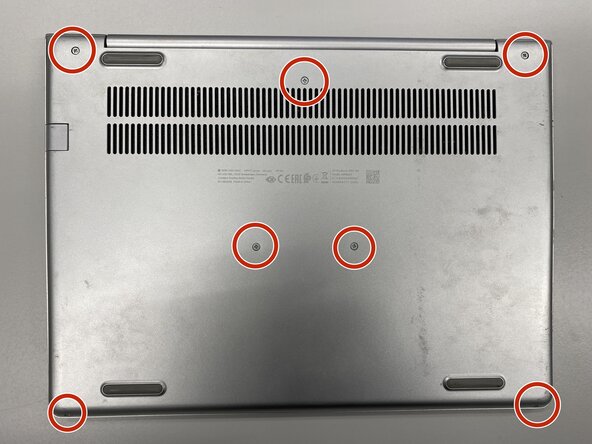
Remove the labeled screws with Phillips #0 screwdriver.
 Ask FixBot
-
-
-
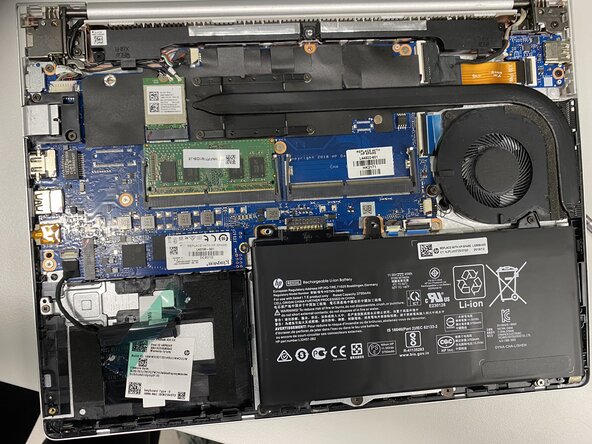
Remove the metal base with iFixit Opening Tool or Opening Picks.
-
-
-
-
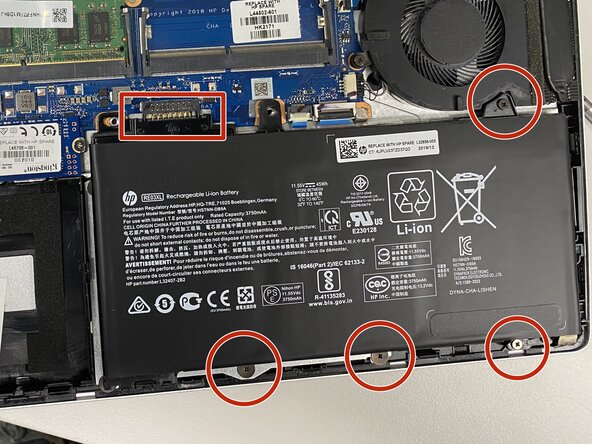
Disconnect the battery by removing the labeled screws and lifting the battery upwards from the box-labeled connector.
-
Battery disconnecting is very important to do before any replacements!
-
-
-
-
-
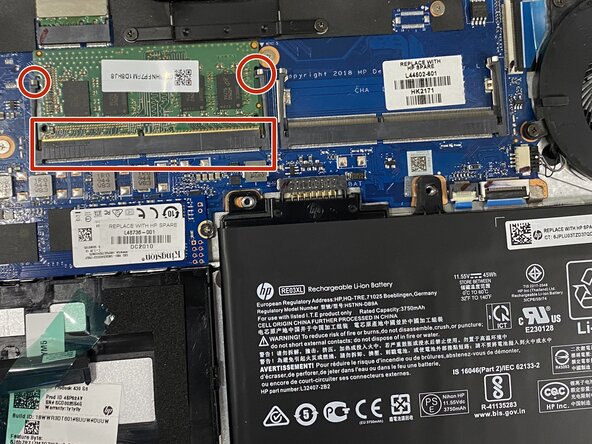
Remove the old memory slot by moving labeled holders on the both sides of the slot.
-
Insert the new memory slot by set its side against the box-labeled interface and plug it by pressing it down.
-
You can too set a slot to the second place.
-
-
If you want to upgrade memory on HP ProBook 430 G6, this guide is for you!

