Free Shipping on Domestic Orders $75+

HP Pavilion x360 11m-ad013dx Speaker Replacement

Views: 686

View statistics:

Past 24 Hours:
1
Past 7 Days:
16
Past 30 Days:
76
All Time:
686
Comments: 0

No one has left comments on this guide. Will you be first?

Go to guide comments
Completed: 0

No one has marked this guide "completed." Will you be the first?

Favorites: 0

No one has favorited (and subscribed to) this guide. Will you be the first?

Time Required: 10 - 15 minutes
Difficulty: Easy
HP Pavilion x360 11m-ad013dx Speaker Replacement

Introduction

Go to step 1 ↓

If the speakers in your HP Pavilion x360 11m-ad013dx are in need of replacement or have stopped functioning properly, use this guide to replace the speakers. For more information about malfunctioning or nonfunctioning speakers, see our troubleshooting page HP Pavilion x360 11m-ad013dx Troubleshooting. The speakers are responsible for producing sound in the laptop. They also give access to work on the motherboard when removed.

What you need

Tools

    1. HP Pavilion x360 11m-ad013dx Speaker Replacement, Keyboard: step 1, image 1 of 1
      • Lay the HP Pavilion top-down with the front edge facing towards you.

      Ask FixBot

      Add Comment

    2. HP Pavilion x360 11m-ad013dx Speaker Replacement: step 2, image 1 of 1
      • Remove the three 4.8mm Phillips #0 screws from the front side.

      Ask FixBot

      Add Comment

    3. HP Pavilion x360 11m-ad013dx Speaker Replacement: step 3, image 1 of 2 HP Pavilion x360 11m-ad013dx Speaker Replacement: step 3, image 2 of 2
      • Using a plastic spudger, remove the grey silicon strip closest to the back-side.

      Ask FixBot

      Add Comment

    4. HP Pavilion x360 11m-ad013dx Speaker Replacement: step 4, image 1 of 1
      • Remove the three 5.7mm Phillips #1 screws.

      Ask FixBot

      Add Comment

    5. HP Pavilion x360 11m-ad013dx Speaker Replacement: step 5, image 1 of 2 HP Pavilion x360 11m-ad013dx Speaker Replacement: step 5, image 2 of 2
      • Open the HP Pavilion so that the screen is showing. Then tilt it down so that the screen is on its back, facing up.

      • Using a spudger, pry off the black keyboard panel.

      • This step requires force to unclasp the latches keeping the keyboard in place.

      Ask FixBot

      Add Comment

    6. HP Pavilion x360 11m-ad013dx Speaker Replacement: step 6, image 1 of 2 HP Pavilion x360 11m-ad013dx Speaker Replacement: step 6, image 2 of 2
      • Using your fingernail, disconnect the zero insertion force (ZIF) keyboard connector cable by flipping up the small locking flap.

      • You may disconnect the other end of the cable, for ease of access to other parts. Keep in mind that the end labeled MB connects to the motherboard.

      Ask FixBot

      Add Comment

    7. HP Pavilion x360 11m-ad013dx Speaker Replacement: step 7, image 1 of 2 HP Pavilion x360 11m-ad013dx Speaker Replacement: step 7, image 2 of 2
      • Using your fingernail, disconnect the zero insertion force (ZIF) connector for the touch pad cable by flipping up the small locking flap.

      Ask FixBot

      Add Comment

    8. HP Pavilion x360 11m-ad013dx Speaker Replacement: step 8, image 1 of 1
      • Remove the keyboard.

      Ask FixBot

      Add Comment

    1. HP Pavilion x360 11m-ad013dx Speaker Replacement, Battery: step 9, image 1 of 1
      • Remove the five 4.6mm Phillips #1 screws located around the battery.

      Ask FixBot

      Add Comment

    2. HP Pavilion x360 11m-ad013dx Speaker Replacement: step 10, image 1 of 2 HP Pavilion x360 11m-ad013dx Speaker Replacement: step 10, image 2 of 2
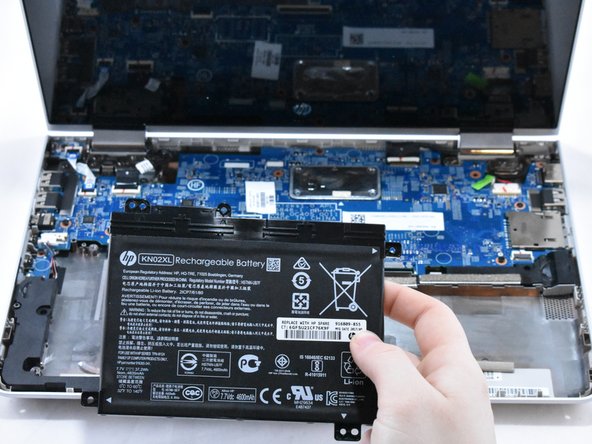
      • Using a spudger for assistance, lift up the right edge of the battery.

      • Remove the battery.

      Ask FixBot

      Add Comment

    1. HP Pavilion x360 11m-ad013dx Speaker Replacement, Speaker: step 11, image 1 of 2 HP Pavilion x360 11m-ad013dx Speaker Replacement, Speaker: step 11, image 2 of 2
      • Using your fingernail, disconnect the ZIF (zero insertion force) hard drive cable by flipping up the small locking flap.

      Ask FixBot

      Add Comment

    2. HP Pavilion x360 11m-ad013dx Speaker Replacement: step 12, image 1 of 2 HP Pavilion x360 11m-ad013dx Speaker Replacement: step 12, image 2 of 2
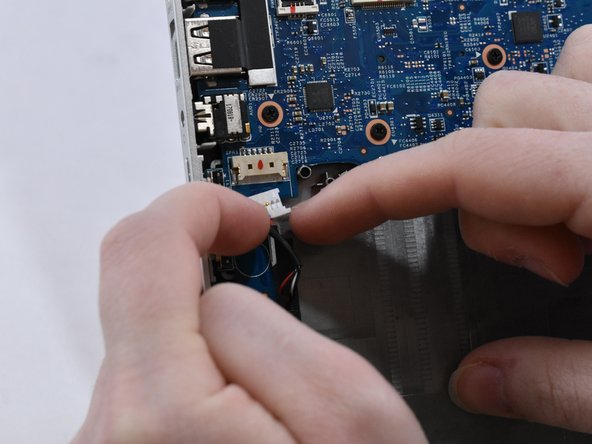
      • With your fingernails, disconnect the speaker cable from the motherboard by pulling back on the connector.

      • Do not directly pull on the wires, as this can damage the connector.

      Ask FixBot

      Add Comment

    3. HP Pavilion x360 11m-ad013dx Speaker Replacement: step 13, image 1 of 2 HP Pavilion x360 11m-ad013dx Speaker Replacement: step 13, image 2 of 2
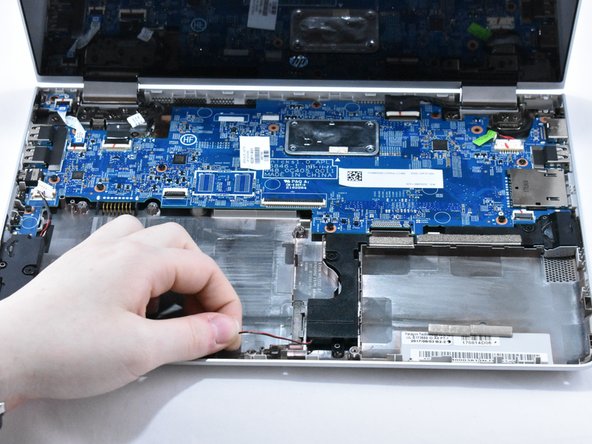
      • Lift the speaker cable from its retention chamber.

      Ask FixBot

      Add Comment

    4. HP Pavilion x360 11m-ad013dx Speaker Replacement: step 14, image 1 of 1
      • Remove the four 6.2mm Phillips #1 screws around the speakers.

      Ask FixBot

      Add Comment

    5. HP Pavilion x360 11m-ad013dx Speaker Replacement: step 15, image 1 of 1
      • Remove the speakers.

      Ask FixBot

      Add Comment

Conclusion

To reassemble your device, follow these instructions in reverse order.

Cancel: I did not complete this guide.

0 Guide Comments

Add Comment

View Statistics:

Past 24 Hours: 1

Past 7 Days: 16

Past 30 Days: 76

All Time: 686