Free Shipping on Domestic Orders $75+

HP Pavilion dv7-4285dx Keyboard Replacement

What you need

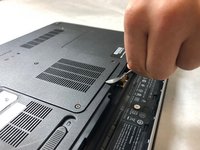
    1. HP Pavilion dv7-4285dx Keyboard  Replacement, Battery: step 1, image 1 of 2 HP Pavilion dv7-4285dx Keyboard  Replacement, Battery: step 1, image 2 of 2
      • Slide the battery release switch to the left. The battery pack will then subsequently release.

      Ask FixBot

      Add Comment

    2. HP Pavilion dv7-4285dx Keyboard  Replacement: step 2, image 1 of 1
      • Remove the battery pack from the socket.

      Ask FixBot

      Add Comment

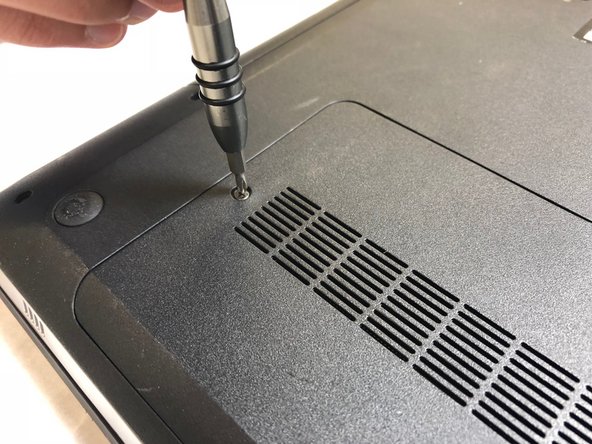
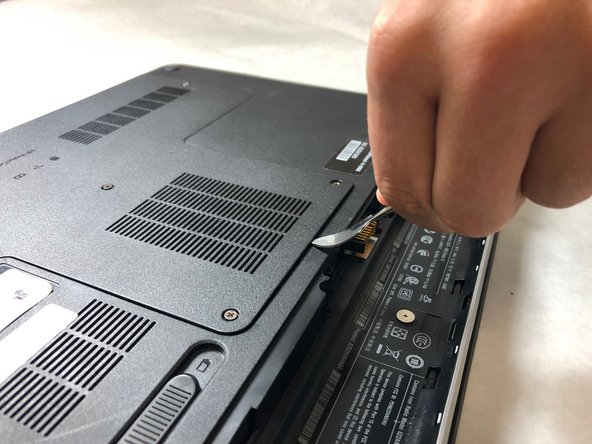
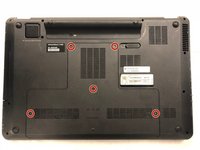
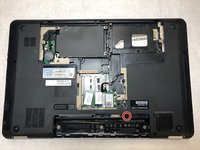
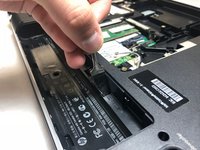
    1. HP Pavilion dv7-4285dx Keyboard  Replacement, Keyboard: step 3, image 1 of 3 HP Pavilion dv7-4285dx Keyboard  Replacement, Keyboard: step 3, image 2 of 3 HP Pavilion dv7-4285dx Keyboard  Replacement, Keyboard: step 3, image 3 of 3
      • Unscrew the 5 black plate screws using a Ph#0 screwdriver.

      • During the removal process, the back plate will retain the 5 back plate screws.

      • Use a metal spudger to carefully remove back plate.

      Ask FixBot

      Add Comment

    2. HP Pavilion dv7-4285dx Keyboard  Replacement: step 4, image 1 of 1
      • Unscrew the 7.2mm screws using a Ph#0 screwdriver.

      Ask FixBot

      Add Comment

    3. HP Pavilion dv7-4285dx Keyboard  Replacement: step 5, image 1 of 2 HP Pavilion dv7-4285dx Keyboard  Replacement: step 5, image 2 of 2
      • Push the keyboard release switch using the metal spudger.

      Ask FixBot

      Add Comment

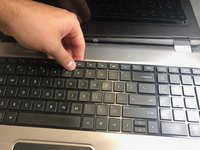
    4. HP Pavilion dv7-4285dx Keyboard  Replacement: step 6, image 1 of 2 HP Pavilion dv7-4285dx Keyboard  Replacement: step 6, image 2 of 2
      • Lift up keyboard from its resting position.

      Ask FixBot

      Add Comment

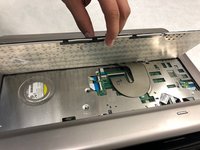
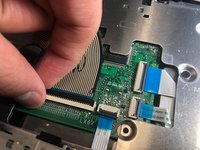
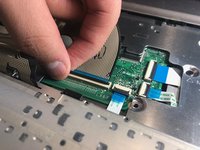
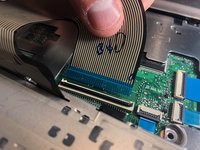
    5. HP Pavilion dv7-4285dx Keyboard  Replacement: step 7, image 1 of 3 HP Pavilion dv7-4285dx Keyboard  Replacement: step 7, image 2 of 3 HP Pavilion dv7-4285dx Keyboard  Replacement: step 7, image 3 of 3
      • Lift up black tab holding ribbon cable.

      • Remove ribbon cable from motherboard.

      Ask FixBot

      Add Comment

    6. HP Pavilion dv7-4285dx Keyboard  Replacement: step 8, image 1 of 1
      • Remove keyboard.

      Ask FixBot

      Add Comment

Conclusion

To reassemble your device, follow these instructions in reverse order.

Cancel: I did not complete this guide.

Austin Sandel

Member since: 11/05/18

363 Reputation

3 Guides authored

Team

IUPUI, Team S1-G2, Baechle Fall 2018 Member of IUPUI, Team S1-G2, Baechle Fall 2018

IUPUI-BAECHLE-F18S1G2

3 Members

36 Guides authored

0 Guide Comments

Add Comment

View Statistics:

Past 24 Hours: 4

Past 7 Days: 20

Past 30 Days: 51

All Time: 883