
HP Pavilion G7-2289wm Touchpad Replacement

Ryson Smith and
Last updated on Aug 6, 2024
Views: 979
View statistics:
- Past 24 Hours:
- 1
- Past 7 Days:
- 13
- Past 30 Days:
- 45
- All Time:
- 979
Comments: 0
No one has left comments on this guide. Will you be first?
Go to guide commentsCompleted: 0 1
No one has marked this guide "completed." Will you be the first?
1 person has marked this guide "completed." It's you — great job!
Favorites: 0 1
No one has favorited (and subscribed to) this guide. Will you be the first?
1 person has favorited (and subscribed to) this guide — and that's you!
Needs More Images
A few more images would make this guide's procedures crystal clear.
Action Shots
Be an action hero! This guide needs images that better demonstrate how to perform specific actions.
Needs Better Images
Better photos will improve this guide. Help out by taking, editing, or uploading new ones!
Missing Steps
Oops! This guide is currently missing one or more important steps.
Introduction
Go to step 1 ↓This guide provides instruction on how to replace a broken or damaged touch pad on the HP Pavilion G7-2289wm laptop.
What you need
Tools


-
-
-
Located on the bottom side of your laptop, slide the battery release latch to the left, towards the center of the laptop.
-
Lift the battery up, and pull towards the center of the laptop to remove it.
 Ask FixBot
-
-
-
-
-
Loosen the screw that secures the service cover using a Phillips #0 screwdriver.
-
Pull the edge of the service cover toward you to remove it.
-
-
-
-
-
-
Remove all the screw that secures the keyboard to the computer using a Phillips #0 screwdriver.
-
-
-
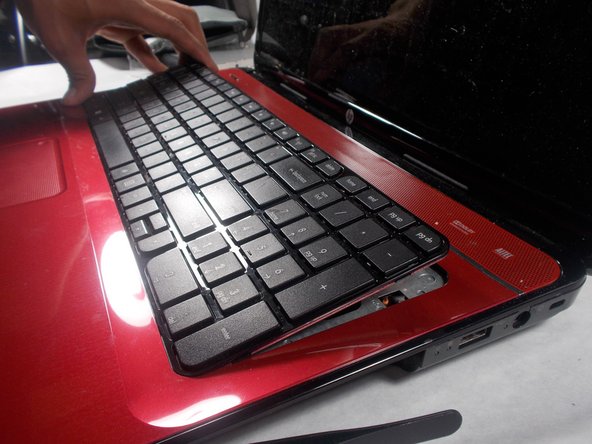
Flip your laptop around to the front, using an opening tool, pry around the perimeter of the keyboard.
-
Lift the keyboard from the top backward towards the touch pad.
-
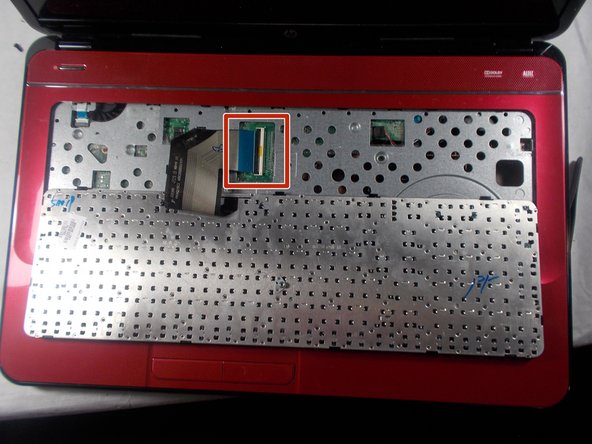
Unlatch the keyboard connector from the motherboard and remove the keyboard.
-
-
-




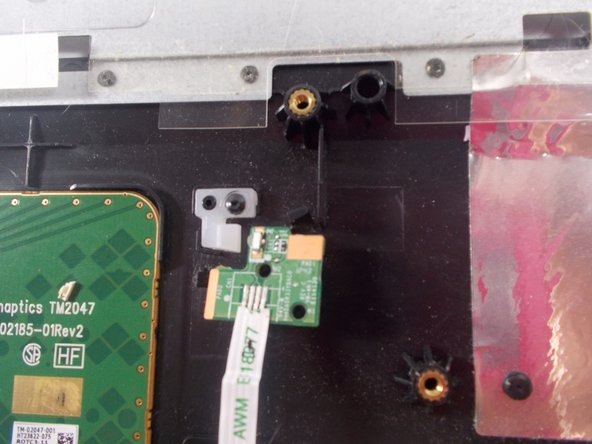

To reassemble your device, follow these instructions in reverse order.

Team

UMass Dartmouth, Team S8-G1, Valliere Spring 2018 Member of UMass Dartmouth, Team S8-G1, Valliere Spring 2018
UMASSD-VALLIERE-S18S8G1
3 Members
84 Guides authored
