Free Shipping on Domestic Orders $75+

HP Mini 210-1199DX RAM Replacement

What you need

    1. HP Mini 210-1199DX RAM Replacement, Battery: step 1, image 1 of 2 HP Mini 210-1199DX RAM Replacement, Battery: step 1, image 2 of 2
      • Unplug the netbook.

      • Secure the netbook in a upright position.

      • Slide the plastic battery latch that secures it into the netbook.

      • Keep thumb secure on the right tab as you begin to remove the battery.

      Ask FixBot

      Add Comment

    2. HP Mini 210-1199DX RAM Replacement: step 2, image 1 of 1
      • Remove the battery from the device.

      Ask FixBot

      Add Comment

    1. HP Mini 210-1199DX RAM Replacement, Bottom Cover: step 3, image 1 of 1
      • Press down on the two orange buttons to release.

      • If the case does not pop off, begin to use Spudger to pry the case off the back.

      Ask FixBot

      Add Comment

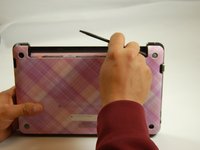
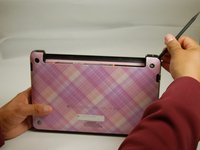
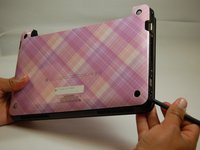
    2. HP Mini 210-1199DX RAM Replacement: step 4, image 1 of 3 HP Mini 210-1199DX RAM Replacement: step 4, image 2 of 3 HP Mini 210-1199DX RAM Replacement: step 4, image 3 of 3
      • Place the spudger on corners and openings in order to begin removal of the back.

      • Continue this on all corner until the case comes fully off of the back.

      Ask FixBot

      Add Comment

    3. HP Mini 210-1199DX RAM Replacement: step 5, image 1 of 1
      • Pull the case off of the device

      Ask FixBot

      Add Comment

    1. HP Mini 210-1199DX RAM Replacement, RAM: step 6, image 1 of 1
      • Locate RAM systems.

      Ask FixBot

      Add Comment

    2. HP Mini 210-1199DX RAM Replacement: step 7, image 1 of 1
      • Use spudger to carefully pull the holding devices back.

      • RAM should pop out once this is completed.

      Ask FixBot

      Add Comment

    3. HP Mini 210-1199DX RAM Replacement: step 8, image 1 of 1
      • Carefully pull the RAM card out.

      Ask FixBot

      Add Comment

Conclusion

To reassemble your device, follow these instructions in reverse order.

Cancel: I did not complete this guide.

One other person completed this guide.

Phillip Winston

Member since: 03/21/17

655 Reputation

6 Guides authored

Team

0 Guide Comments

Add Comment

View Statistics:

Past 24 Hours: 2

Past 7 Days: 9

Past 30 Days: 23

All Time: 630