Free Shipping on Domestic Orders $75+

HP Mini 1000 Hard Drive Replacement

Prerequisite Only
This is a prerequisite-only guide! This guide is part of another procedure and isn’t meant to be used alone.

What you need

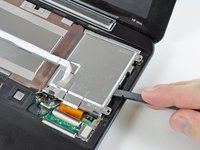
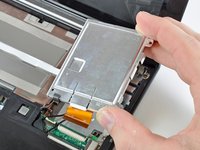
    1. HP Mini 1000 Hard Drive Replacement, Hard Drive: step 1, image 1 of 2 HP Mini 1000 Hard Drive Replacement, Hard Drive: step 1, image 2 of 2
      • Use your fingernail or the flat end of a spudger to flip up the retaining flap on the SIM card ribbon cable ZIF socket.

      • Be sure you are prying up on the retaining flap, not the socket itself.

      • Pull the SIM card ribbon cable out of its socket and peel it off the top of the hard drive enclosure.

      Ask FixBot

      Add Comment

    2. HP Mini 1000 Hard Drive Replacement: step 2, image 1 of 1
      • Use your fingernail or the flat end of a spudger to flip up the retaining flap on the hard drive cable ZIF socket.

      • Be sure you are prying up on the retaining flap, not the socket itself.

      Ask FixBot

      Add Comment

    3. HP Mini 1000 Hard Drive Replacement: step 3, image 1 of 1
      • Remove the two 4.5 mm Phillips screws securing the hard drive to the lower case.

      Ask FixBot

      Add Comment

    4. HP Mini 1000 Hard Drive Replacement: step 4, image 1 of 2 HP Mini 1000 Hard Drive Replacement: step 4, image 2 of 2
      • Lift the hard drive up and out of the lower case, being careful not to damage its cable in the process.

      Ask FixBot

      Add Comment

Conclusion

To reassemble your device, follow these instructions in reverse order.

Cancel: I did not complete this guide.

0 Guide Comments

Add Comment

View Statistics:

Past 24 Hours: 1

Past 7 Days: 6

Past 30 Days: 13

All Time: 405