Introduction
A brief guide on how to replace the RAM in an HP G62-340.
What you need
-
-
-
Turn off the computer.
-
Unplug the charging cable from the computer.
-
Turn your laptop over and place it on a firm surface.
 Ask FixBot
-
-
-
-
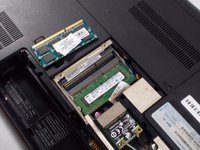
Locate the memory module compartment.
-
Use a screwdriver to remove the three Phillips PM2.5x6.0 captive screws and remove the cover on the memory module compartment.
-
-
-
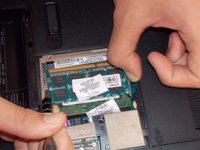
If you need to remove memory before installing the new memory, release the memory using a small wooden tool, or fingernail, to spread the clips holding the memory.
-
-


To reassemble your device, follow these instructions in reverse order.

Team

UMass Dartmouth, Team S1-G4, Isaacson Fall 2017 Member of UMass Dartmouth, Team S1-G4, Isaacson Fall 2017
UMASSD-ISAACSON-F17S1G4
3 Members
36 Guides authored
