Introduction
Changing the battery may be necessary if the device wont power up, or doesn't seem to hold a charge anymore. The most challenging step to changing the battery is removing the back cover. Acquiring the tools listed (or similar) are absolutely necessary for a complication free battery replacement.
What you need
-
-
-
Using the T5 Torx Screwdriver, remove the T5x3mm screws located in all 4 corners.
 Ask FixBot
-
-
-
Use the plastic opening tool to push in between the front and the back of the tablet.
-
Slide the plastic opening tool around all 4 sides of the tablet to separate the back cover.
-
-
-
-
Continue sliding the plastic opening tool around the tablet until all 4 sides are separated from each other.
-
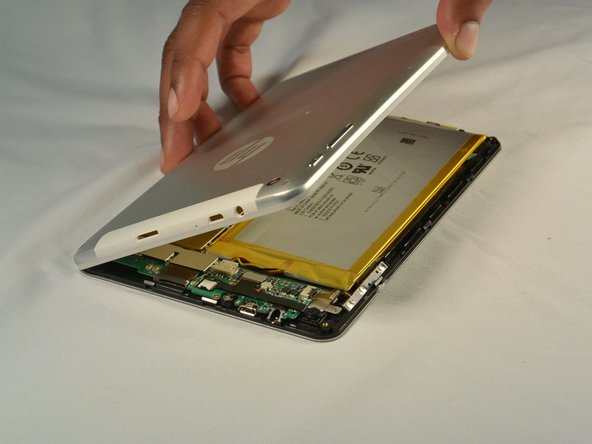
Remove the back cover.
-
-
-
-
-
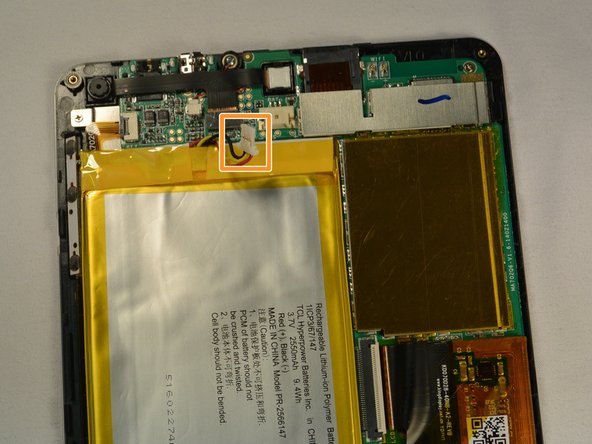
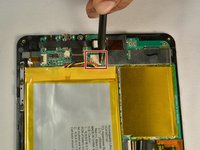
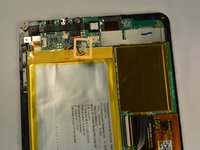
Push out the battery connector using the spudger.
-
Swing the battery connector clear of the connector socket.
-
-




To reassemble your device, follow these instructions in reverse order. Use new double sided tape to secure the new battery.
Cancel: I did not complete this guide.
One other person completed this guide.

Team

IUPUI, Team 1-2, Renguette SU 2015 Member of IUPUI, Team 1-2, Renguette SU 2015
IUPUI-RENGUETTE-SU15S1G2
5 Members
48 Guides authored
