Introduction
If you are planning on replacing any of the internal components of your HP 17-x061nr laptop then you will need to remove the back. This particular laptop is built with a solid back cover that the keyboard and internal components are seated into. There are a lot of screws that hold the laptop together including 2 that are hidden under the rubber footrests. Pay careful attention to this guide and you will have your laptop disassembled and be able to replace any internal components easily.
What you need
-
-
-
With the laptop upside down, remove the battery by hand and the twelve 7.0 mm screws that are holding the back case to the front. Use a JIS #0 screwdriver to remove the screws.
 Ask FixBot
-
-
-
Peel back the rubber footrests located next to the battery, on the left and right sides.
-
Remove the two 7.0 mm screws underneath the rubber feet using a JIS #0 screwdriver.
-
-
-
-
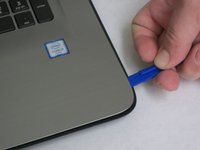
Flip the computer over and use a plastic opening tool to wedge between the back and front cases.
-
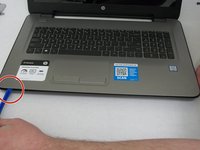
Trace the perimeter of the laptop. Make sure to keep the tool inserted between the front and back cases. You will hear popping sounds as the back case becomes disengaged from the front plate.
-
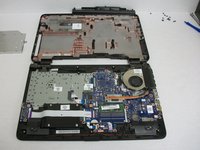
Flip the laptop over and lift the back case off. Now you have access to all of the internal hardware.
-
-


To reassemble your device, follow these instructions in reverse order.
Cancel: I did not complete this guide.
7 other people completed this guide.

Team

Washington State, Team S1-G1, Lobnitz Spring 2018 Member of Washington State, Team S1-G1, Lobnitz Spring 2018
WSU-LOBNITZ-S18S1G1
5 Members
60 Guides authored
3 Guide Comments
I have a 17-x051nr but the steps are exactly the same. Thank you! (I never like peeling off the bottom feet unless I know for sure there’s a screw under there)
Thank you! Also worked for HP-14AN013NA
