Introduction
This guide will show you how to replace the RAM in your HP 14-dq0052dx laptop.
What you need
-
-
-
-
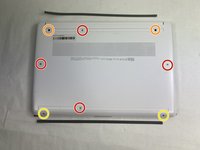
Remove the four M2.0 x 6 mm screws using a JIS #1 screwdriver.
-
Remove the two M2.5 x 6 mm screws using a JIS #1 screwdriver.
-
Remove the two M2.0 x 4 mm screws using a JIS #1 screwdriver.
-
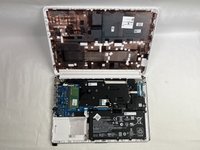
Use an iFixit opening tool to pry the back cover away from the laptop.
-
-
-
-
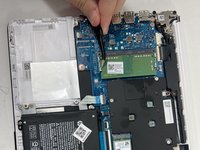
Use tweezers to push the supporting tabs outwards to free the RAM.
-
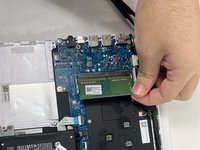
Pick up the RAM gently to remove.
-
-

 Ask FixBot




To reassemble your device, follow these instructions in reverse order.
Cancel: I did not complete this guide.
One other person completed this guide.

Team

UMass Dartmouth, Team 2-5, Konn Fall 2024 Member of UMass Dartmouth, Team 2-5, Konn Fall 2024
UMASSD-KONN-F24S2G5
4 Members
56 Guides authored
