
HMD Barbie Inner Backplate Replacement

Hannah Carvalho and 2 other contributors
Last updated on Jun 3, 2026
Views: 209
View statistics:
- Past 24 Hours:
- 1
- Past 7 Days:
- 7
- Past 30 Days:
- 46
- All Time:
- 209
Comments: 0
No one has left comments on this guide. Will you be first?
Go to guide commentsCompleted: 1 2
1 person has marked this guide "completed." Will you be next?
2 people have marked this guide "completed." Including you — great job!
Favorites: 0 1
No one has favorited (and subscribed to) this guide. Will you be the first?
1 person has favorited (and subscribed to) this guide — and that's you!
Introduction
Go to step 1 ↓The HMD Barbie Phone (model number TA-1420) inner backplate is the part of the phone beneath the outer backplate that protects the motherboard and also holds the removable battery. If there is significant damage to the inner backplate or if there is difficulty keeping the battery in place, you may want to replace this part. Removing this part is an important step in accessing the motherboard and keypad of the phone.
When prying off the inner backplate in Step 2 of this guide, ensure that the side buttons and charging port are fully released from the inner backplate to prevent damage.
What you need
Tools


-
-
-
Fully power off the phone.
-
Remove the backplate by gripping it around the edges and pulling away from the phone.
 Ask FixBot
-
-
-


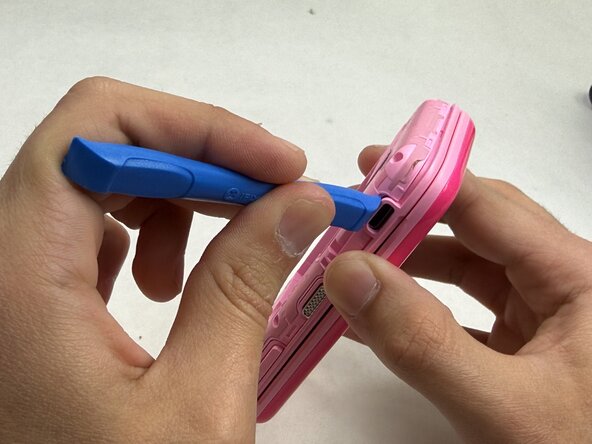


To reassemble your device, follow these instructions in reverse order.
Cancel: I did not complete this guide.
One other person completed this guide.

Team

UMass Dartmouth, Team 6-2, Botvin Spring 2026 Member of UMass Dartmouth, Team 6-2, Botvin Spring 2026
UMASSD-BOTVIN-S26S6G2
3 Members
60 Guides authored
