Free Shipping on Domestic Orders $75+

Google Pixel 9a Front Camera Installation

Prerequisite Only
This is a prerequisite-only guide! This guide is part of another procedure and isn’t meant to be used alone.
    1. Google Pixel 9a Front Camera Installation, Remove any lens caps or liners: step 1, image 1 of 1
      • Remove any caps or plastic liners from your replacement front camera lens.

      • Be careful not to grip or smudge the exposed lens.

      Ask FixBot

      Add Comment

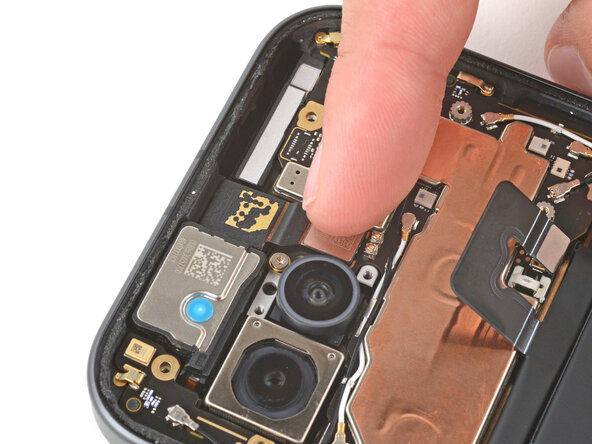
    2. Google Pixel 9a Front Camera Installation, Install the front camera: step 2, image 1 of 2 Google Pixel 9a Front Camera Installation, Install the front camera: step 2, image 2 of 2
      • Place the front camera into its recess.

      • Use your finger to press down and reconnect the front camera press connector.

      Ask FixBot

      Add Comment

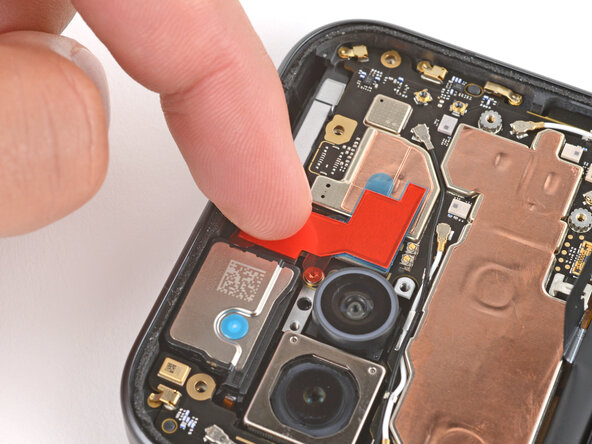
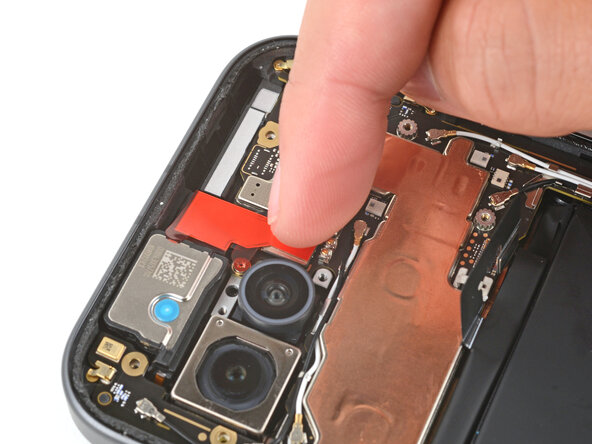
    3. Google Pixel 9a Front Camera Installation, Apply new copper foil: step 3, image 1 of 3 Google Pixel 9a Front Camera Installation, Apply new copper foil: step 3, image 2 of 3 Google Pixel 9a Front Camera Installation, Apply new copper foil: step 3, image 3 of 3
      • Remove the copper foil from its large clear liner and place it onto the front camera.

      • Don't remove any of the other liners yet.

      • Gently press down on the top section of the foil to secure it to the camera (the bottom section still has a plastic liner under it).

      Ask FixBot

      Add Comment

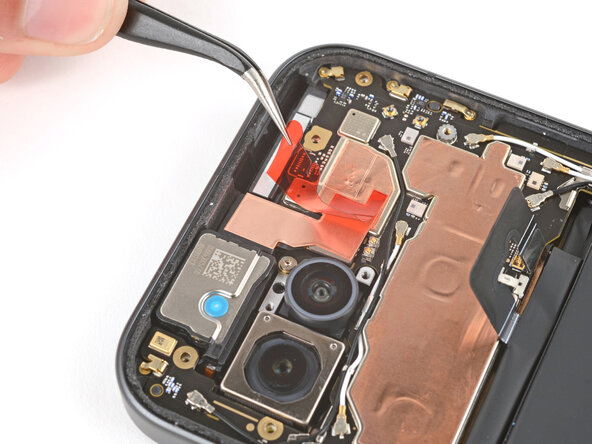
    4. Google Pixel 9a Front Camera Installation: step 4, image 1 of 3 Google Pixel 9a Front Camera Installation: step 4, image 2 of 3 Google Pixel 9a Front Camera Installation: step 4, image 3 of 3
      • Hold the top section of the copper foil in place with your finger, and use tweezers to slide the liner out from the bottom section of foil.

      • Gently press the bottom section of copper foil into place to secure it to the front camera press connector.

      Ask FixBot

      Add Comment

    5. Google Pixel 9a Front Camera Installation: step 5, image 1 of 3 Google Pixel 9a Front Camera Installation: step 5, image 2 of 3 Google Pixel 9a Front Camera Installation: step 5, image 3 of 3
      • Use tweezers to remove the remaining liner from the top of the copper foil.

      Ask FixBot

      Add Comment

Finish Line

Cancel: I did not complete this guide.

Spencer Day

Member since: 09/14/22

205,788 Reputation

1,267 Guides authored

Team

iFixit Member of iFixit

Staff

122 Members

72,401 Guides authored

0 Guide Comments

Add Comment

View Statistics:

Past 24 Hours: 2

Past 7 Days: 5

Past 30 Days: 15

All Time: 134