Free Shipping on Domestic Orders $75+

Google Pixel 6 Screen Replacement

Archived Guide
This guide is retained solely for historical purposes. Use the updated version of the guide to perform your repair.

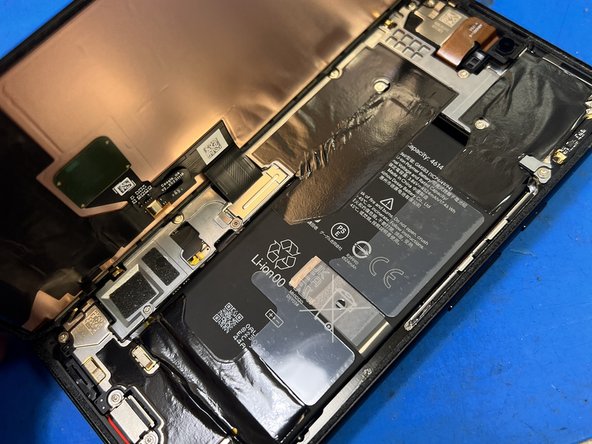
What you need

    1. Google Pixel 6 Screen Replacement, Google Pixel 6 screen replacement: step 1, image 1 of 2 Google Pixel 6 Screen Replacement, Google Pixel 6 screen replacement: step 1, image 2 of 2
      • Google Pixel 6 with broken screen.

      • Let's replace it!

      Ask FixBot

      Add Comment

    2. Google Pixel 6 Screen Replacement, Apply heat to loosen adhesive: step 2, image 1 of 1
      • Place phone on heat mat.

      • Temp is set at 75C.

      • After about 5-6 minutes, glue is loosened up.

      Ask FixBot

      Add Comment

    3. Google Pixel 6 Screen Replacement, Screen removal: step 3, image 1 of 2 Google Pixel 6 Screen Replacement, Screen removal: step 3, image 2 of 2
      • start lifting screen from bottom of the phone

      • LCD connector is located left side of the phone, so you should work your way counter-clock wise.

      Ask FixBot

      Add Comment

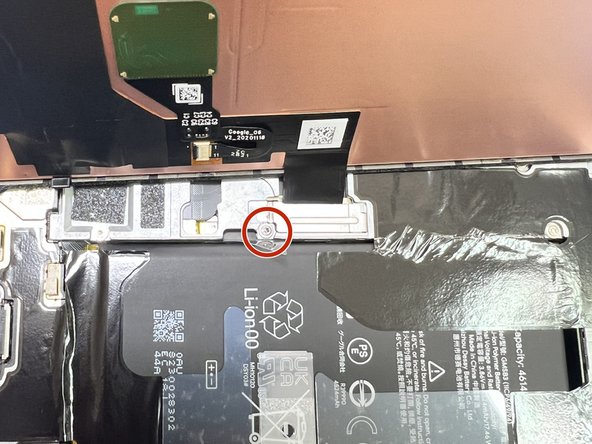
    4. Google Pixel 6 Screen Replacement, Remove connector cover: step 4, image 1 of 3 Google Pixel 6 Screen Replacement, Remove connector cover: step 4, image 2 of 3 Google Pixel 6 Screen Replacement, Remove connector cover: step 4, image 3 of 3
      • Lift screen from right to left.

      • Use T3 Torx driver to remove screw to remove FPC cover.

      Ask FixBot

      Add Comment

    5. Google Pixel 6 Screen Replacement, Screen removed: step 5, image 1 of 1
      • Remove connector from board

      • screen successfully removed.

      Ask FixBot

      Add Comment

    6. Google Pixel 6 Screen Replacement, Fingerprint sensor removal: step 6, image 1 of 3 Google Pixel 6 Screen Replacement, Fingerprint sensor removal: step 6, image 2 of 3 Google Pixel 6 Screen Replacement, Fingerprint sensor removal: step 6, image 3 of 3
      • The sensor is attached to screen with adhesive. DO NOT FORCE to remove, it can easily tear.

      • Apply 100C heat around the flex.

      • Gently work around to remove flex off screen.

      Ask FixBot

      Add Comment

    7. Google Pixel 6 Screen Replacement, Extra Step - Remove screen frame: step 7, image 1 of 1
      • If you got the screen without frame, you must remove frame from original screen and transfer to replacement screen.

      • Place screen on heat map to loosen glue to remove frame from screen.

      Ask FixBot

      Add Comment

    8. Google Pixel 6 Screen Replacement, Final Stage: step 8, image 1 of 1
      • Once screen is glued to frame well, just snap back to frame to finish replacement.

      Ask FixBot

      Add Comment

Conclusion

To reassemble your device, follow these instructions in reverse order.

Cancel: I did not complete this guide.

iFIX smartphone

Member since: 06/17/11

1,894 Reputation

1 Guide authored

0 Guide Comments

Add Comment

View Statistics:

Past 24 Hours: 0

Past 7 Days: 1

Past 30 Days: 7

All Time: 459