
Nest Hello O-Ring Replacement

Jason Valencia and 4 other contributors
Last updated on May 27, 2020
Views: 5.5K
View statistics:
- Past 24 Hours:
- 1
- Past 7 Days:
- 15
- Past 30 Days:
- 84
- All Time:
- 5,476
Comments: 21
19 comments on steps, 2 guide comments.
Go to guide commentsCompleted: 3 4
3 people have marked this guide "completed." Will you be next?
4 people have marked this guide "completed." Including you — great job!
Favorites: 0 1
No one has favorited (and subscribed to) this guide. Will you be the first?
1 person has favorited (and subscribed to) this guide — and that's you!
Introduction
Go to step 1 ↓This guide will help you replace a leaky O-Ring caused by exposure to the elements or damage during disassembly. All you will need to access this are iFixit opening picks. It is recommended that this is replaced anytime the device is opened as it can be pinched or torn during removal of the face plate or device housing.
What you need
Tools
-
Spudger4.9
-


-
-
-
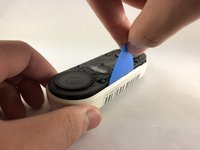
Insert the pick between the black faceplate and white casing of the Nest Hello.
-
Pry the faceplate away from the device with the opening pick.
-
Completely remove the faceplate from the device, do not be afraid to pull hard.
 Ask FixBot
-
-
-
Peel back the cover stickers and use the Phillips #000 screwdriver to remove the four screws.
-
-
-
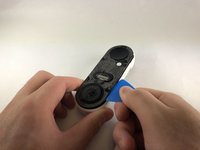
Insert opening pick between the white casing and the black internal circuitry and pry it out.
-
-
-
-
-
-
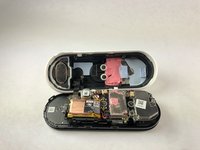
Remove the O-Ring (colored blue) from the device. It is placed around the edge of the motherboard.
-
-



To reassemble your device, follow these instructions in reverse order.
Cancel: I did not complete this guide.
3 other people completed this guide.

Team

Embry-Riddle Aeronautical University, Team S1-G7, Cromer Twal Spring 2020 Member of Embry-Riddle Aeronautical University, Team S1-G7, Cromer Twal Spring 2020
ERAU-CROMER TWAL-S20S1G7
4 Members
84 Guides authored
