Free Shipping on Domestic Orders $75+

Google Pixel 10 Pro Fold Loudspeaker Installation

Prerequisite Only
This is a prerequisite-only guide! This guide is part of another procedure and isn’t meant to be used alone.
    1. Google Pixel 10 Pro Fold Loudspeaker Installation, Place the loudspeaker: step 1, image 1 of 3 Google Pixel 10 Pro Fold Loudspeaker Installation, Place the loudspeaker: step 1, image 2 of 3 Google Pixel 10 Pro Fold Loudspeaker Installation, Place the loudspeaker: step 1, image 3 of 3
      • Insert the loudspeaker at an angle into the bottom of the frame and press down to secure it.

      Ask FixBot

      Add Comment

    2. Google Pixel 10 Pro Fold Loudspeaker Installation, Install the loudspeaker screw: step 2, image 1 of 2 Google Pixel 10 Pro Fold Loudspeaker Installation, Install the loudspeaker screw: step 2, image 2 of 2
      • Use a Torx Plus 3IP driver to install the 2.4 mm‑long screw securing the loudspeaker.

      Ask FixBot

      Add Comment

    3. Google Pixel 10 Pro Fold Loudspeaker Installation, Remove the conductive fabric: step 3, image 1 of 3 Google Pixel 10 Pro Fold Loudspeaker Installation, Remove the conductive fabric: step 3, image 2 of 3 Google Pixel 10 Pro Fold Loudspeaker Installation, Remove the conductive fabric: step 3, image 3 of 3
      • Use tweezers or your fingers to peel off the conductive fabric on top of the loudspeaker.

      Ask FixBot

      Add Comment

    4. Google Pixel 10 Pro Fold Loudspeaker Installation: step 4, image 1 of 1
      • If there's some adhesive residue left on the loudspeaker, use isopropyl alcohol (>90%) and a coffee filter or a microfiber cloth to remove it.

      Ask FixBot

      Add Comment

    5. Google Pixel 10 Pro Fold Loudspeaker Installation, Apply the conductive fabric: step 5, image 1 of 3 Google Pixel 10 Pro Fold Loudspeaker Installation, Apply the conductive fabric: step 5, image 2 of 3 Google Pixel 10 Pro Fold Loudspeaker Installation, Apply the conductive fabric: step 5, image 3 of 3
      • Peel off the clear liner on the top loudspeaker conductive fabric.

      • Place the conductive fabric over its spot on the loudspeaker.

      Ask FixBot

      Add Comment

    6. Google Pixel 10 Pro Fold Loudspeaker Installation: step 6, image 1 of 2 Google Pixel 10 Pro Fold Loudspeaker Installation: step 6, image 2 of 2
      • Use the flat end of a spudger or your fingers to press down the conductive fabric and adhere it.

      Ask FixBot

      Add Comment

    7. Google Pixel 10 Pro Fold Loudspeaker Installation: step 7, image 1 of 2 Google Pixel 10 Pro Fold Loudspeaker Installation: step 7, image 2 of 2
      • Remove the small, rounded blue liner on the underside of the tape.

      • Press down the fabric so it adheres to the frame.

      Ask FixBot

      Add Comment

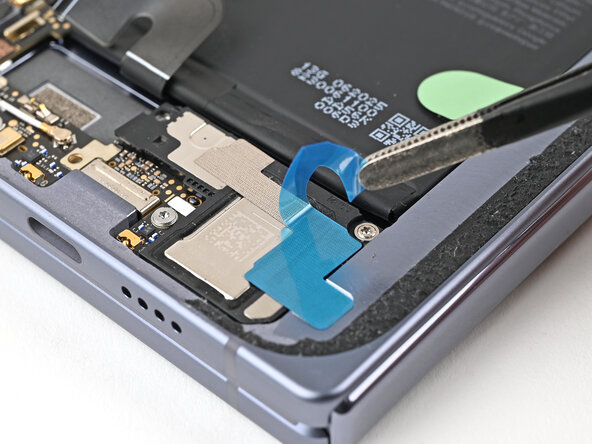
    8. Google Pixel 10 Pro Fold Loudspeaker Installation: step 8, image 1 of 3 Google Pixel 10 Pro Fold Loudspeaker Installation: step 8, image 2 of 3 Google Pixel 10 Pro Fold Loudspeaker Installation: step 8, image 3 of 3
      • Remove the large blue liner from the conductive fabric.

      Ask FixBot

      Add Comment

Conclusion

To reassemble your device, follow these instructions in reverse order.

Cancel: I did not complete this guide.

Alex Diaz-Kokaisl

Member since: 01/16/22

250,095 Reputation

1,203 Guides authored

0 Guide Comments

Add Comment

View Statistics:

Past 24 Hours: 0

Past 7 Days: 1

Past 30 Days: 1

All Time: 18