Free Shipping on Domestic Orders $75+

GoPro HD Hero2 Speaker Replacement

Views: 5.8K

View statistics:

Past 24 Hours:
2
Past 7 Days:
22
Past 30 Days:
100
All Time:
5,822
Comments: 4

4 comments on steps.

Completed: 0

No one has marked this guide "completed." Will you be the first?

Favorites: 1

1 person has favorited (and subscribed to) this guide. Will you be next?

Time Required: No estimate
Difficulty: Difficult
GoPro HD Hero2 Speaker Replacement

Introduction

Go to step 1 ↓

No camcorder is complete without beeps to give you feedback to know that you're pressing the right buttons. If you launched your GoPro off a cliff and it no longer produces any sounds, you probably need a new speaker.

What you need

Tools

    1. GoPro HD Hero2 Speaker Replacement, Back Cover: step 1, image 1 of 2 GoPro HD Hero2 Speaker Replacement, Back Cover: step 1, image 2 of 2
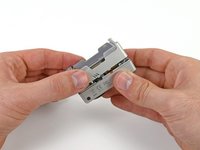
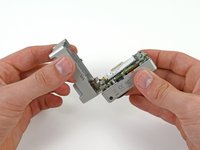
      • Place your thumb on the indentation in the back case on the side of the GoPro.

      • Gently press down with your thumb and lift the back cover away from the case to remove it.

      Ask FixBot

      Add Comment

    1. GoPro HD Hero2 Speaker Replacement, Battery: step 2, image 1 of 2 GoPro HD Hero2 Speaker Replacement, Battery: step 2, image 2 of 2
      • Slide a plastic opening tool between the battery and the rear case.

      • Gently pry the battery up and out of the rear case.

      Ask FixBot

      Add Comment

    2. GoPro HD Hero2 Speaker Replacement: step 3, image 1 of 1
      • Remove the battery from the case.

      Ask FixBot

      Add Comment

    1. GoPro HD Hero2 Speaker Replacement, Rear Case: step 4, image 1 of 1
      • Remove the four Phillips #00 screws securing the rear case to the rest of the device:

      • Two 5.5 mm coarse thread screws.

      • Two 4.4 mm fine thread screws.

      Ask FixBot

      Add Comment

    2. GoPro HD Hero2 Speaker Replacement: step 5, image 1 of 2 GoPro HD Hero2 Speaker Replacement: step 5, image 2 of 2
      • Slide the edge of a plastic opening tool underneath the sticker on the rear cover and gently peel the sticker up.

      • Once you have enough of the sticker peeled up with the plastic opening tool, grab an edge of it with your fingers and pull it off completely.

      Ask FixBot

      Add Comment

    3. GoPro HD Hero2 Speaker Replacement: step 6, image 1 of 2 GoPro HD Hero2 Speaker Replacement: step 6, image 2 of 2
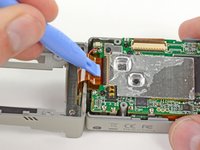
      • Grasp the rear case and lift it off of the front case.

      • Do not try to completely remove the rear case yet, as it is still attached by the display port ribbon cable.

      Ask FixBot

      Add Comment

    4. GoPro HD Hero2 Speaker Replacement: step 7, image 1 of 2 GoPro HD Hero2 Speaker Replacement: step 7, image 2 of 2
      Tool used on this step:
      Tweezers
      $4.99
      Buy
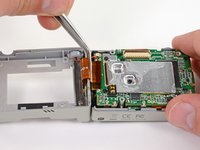
      • Using a plastic opening tool or your fingernail, flip up the locking tab on the SD board ribbon cable ZIF connector on the motherboard assembly.

      • Be careful that you are prying on the locking tab, and not the connector itself.

      • Use a pair of tweezers to remove the SD board ribbon cable from its connector on the motherboard.

      Ask FixBot

      Add Comment

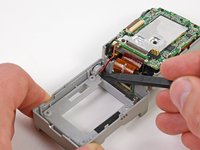
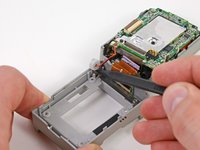
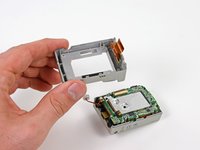
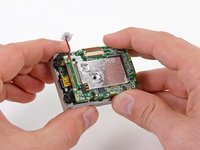
    5. GoPro HD Hero2 Speaker Replacement: step 8, image 1 of 3 GoPro HD Hero2 Speaker Replacement: step 8, image 2 of 3 GoPro HD Hero2 Speaker Replacement: step 8, image 3 of 3
      • Lift the speaker out of the rear case with the tip of a spudger.

      • Remove the rear case.

      Ask FixBot

      Add Comment

    1. GoPro HD Hero2 Speaker Replacement, Motherboard Assembly: step 9, image 1 of 1
      • Remove the three screws securing the motherboard assembly to the front case:

      • Two 10.8 mm Phillips #00 screws.

      • One 4.8 mm Phillips #00 screw.

      Ask FixBot

      Add Comment

    2. GoPro HD Hero2 Speaker Replacement: step 10, image 1 of 2 GoPro HD Hero2 Speaker Replacement: step 10, image 2 of 2
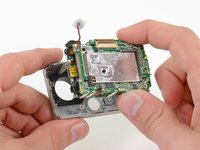
      • Gently grab the edges of the motherboard assembly and lift it out of the front case.

      Ask FixBot

      Add Comment

    1. GoPro HD Hero2 Speaker Replacement, Speaker: step 11, image 1 of 1
      • Use a soldering iron and solder wick to desolder the speaker contacts on the motherboard assembly.

      • For an in-depth tutorial on surface mount soldering and desoldering technique, see our Repairing Soldered Connections guide.

      Ask FixBot

      Add Comment

Conclusion

To reassemble your device, follow these instructions in reverse order.

Cancel: I did not complete this guide.

David Hodson

Member since: 04/13/10

157,057 Reputation

127 Guides authored

0 Guide Comments

Add Comment

View Statistics:

Past 24 Hours: 2

Past 7 Days: 22

Past 30 Days: 100

All Time: 5,822