Free Shipping on Domestic Orders $75+

GoPro HD Hero2 Motherboard Assembly Replacement

Views: 19K

View statistics:

Past 24 Hours:
3
Past 7 Days:
25
Past 30 Days:
124
All Time:
19,439
Comments: 6

4 comments on steps, 2 guide comments.

Go to guide comments
Completed: 8

8 people have marked this guide "completed." Will you be next?

Favorites: 5

5 people have favorited (and subscribed to) this guide. Will you be next?

Time Required: No estimate
Difficulty: Moderate
GoPro HD Hero2 Motherboard Assembly Replacement

Introduction

Go to step 1 ↓

Many of the components of the GoPro HD Hero2 lie on one of the three boards that make up the motherboard assembly. Remove the entire assembly before finding the specific component you're looking for.

What you need

Tools

    1. GoPro HD Hero2 Motherboard Assembly Replacement, Back Cover: step 1, image 1 of 2 GoPro HD Hero2 Motherboard Assembly Replacement, Back Cover: step 1, image 2 of 2
      • Place your thumb on the indentation in the back case on the side of the GoPro.

      • Gently press down with your thumb and lift the back cover away from the case to remove it.

      Ask FixBot

      Add Comment

    1. GoPro HD Hero2 Motherboard Assembly Replacement, Battery: step 2, image 1 of 2 GoPro HD Hero2 Motherboard Assembly Replacement, Battery: step 2, image 2 of 2
      • Slide a plastic opening tool between the battery and the rear case.

      • Gently pry the battery up and out of the rear case.

      Ask FixBot

      Add Comment

    2. GoPro HD Hero2 Motherboard Assembly Replacement: step 3, image 1 of 1
      • Remove the battery from the case.

      Ask FixBot

      Add Comment

    1. GoPro HD Hero2 Motherboard Assembly Replacement, Rear Case: step 4, image 1 of 1
      • Remove the four Phillips #00 screws securing the rear case to the rest of the device:

      • Two 5.5 mm coarse thread screws.

      • Two 4.4 mm fine thread screws.

      Ask FixBot

      Add Comment

    2. GoPro HD Hero2 Motherboard Assembly Replacement: step 5, image 1 of 2 GoPro HD Hero2 Motherboard Assembly Replacement: step 5, image 2 of 2
      • Slide the edge of a plastic opening tool underneath the sticker on the rear cover and gently peel the sticker up.

      • Once you have enough of the sticker peeled up with the plastic opening tool, grab an edge of it with your fingers and pull it off completely.

      Ask FixBot

      Add Comment

    3. GoPro HD Hero2 Motherboard Assembly Replacement: step 6, image 1 of 2 GoPro HD Hero2 Motherboard Assembly Replacement: step 6, image 2 of 2
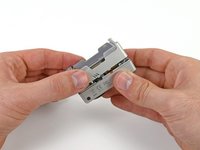
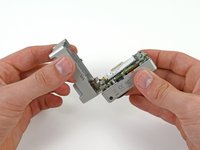
      • Grasp the rear case and lift it off of the front case.

      • Do not try to completely remove the rear case yet, as it is still attached by the display port ribbon cable.

      Ask FixBot

      Add Comment

    4. GoPro HD Hero2 Motherboard Assembly Replacement: step 7, image 1 of 2 GoPro HD Hero2 Motherboard Assembly Replacement: step 7, image 2 of 2
      Tool used on this step:
      Tweezers
      $4.99
      Buy
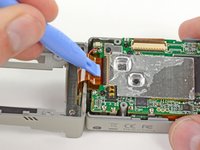
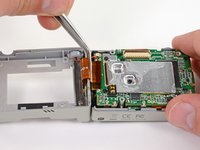
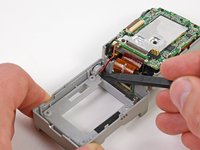
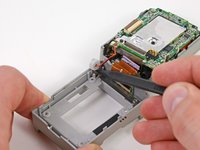
      • Using a plastic opening tool or your fingernail, flip up the locking tab on the SD board ribbon cable ZIF connector on the motherboard assembly.

      • Be careful that you are prying on the locking tab, and not the connector itself.

      • Use a pair of tweezers to remove the SD board ribbon cable from its connector on the motherboard.

      Ask FixBot

      Add Comment

    5. GoPro HD Hero2 Motherboard Assembly Replacement: step 8, image 1 of 3 GoPro HD Hero2 Motherboard Assembly Replacement: step 8, image 2 of 3 GoPro HD Hero2 Motherboard Assembly Replacement: step 8, image 3 of 3
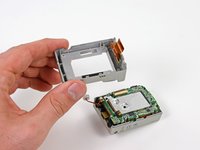
      • Lift the speaker out of the rear case with the tip of a spudger.

      • Remove the rear case.

      Ask FixBot

      Add Comment

    1. GoPro HD Hero2 Motherboard Assembly Replacement, Motherboard Assembly: step 9, image 1 of 1
      • Remove the three screws securing the motherboard assembly to the front case:

      • Two 10.8 mm Phillips #00 screws.

      • One 4.8 mm Phillips #00 screw.

      Ask FixBot

      Add Comment

    2. GoPro HD Hero2 Motherboard Assembly Replacement: step 10, image 1 of 2 GoPro HD Hero2 Motherboard Assembly Replacement: step 10, image 2 of 2
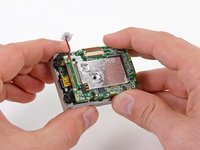
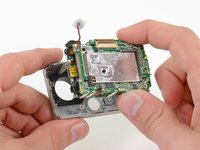
      • Gently grab the edges of the motherboard assembly and lift it out of the front case.

      Ask FixBot

      Add Comment

Conclusion

To reassemble your device, follow these instructions in reverse order.

Cancel: I did not complete this guide.

8 other people completed this guide.

David Hodson

Member since: 04/13/10

157,078 Reputation

127 Guides authored

2 Guide Comments

Where exactly do you buy the replacement boards? I cant find them anywhere..

Lauren Ashleyy - Reply Share

Hello. GoPro HERO2 there. overheating after doing update. 10-15 minutes after closing. overheating.

coskunadnan - Reply Share

Add Comment

View Statistics:

Past 24 Hours: 3

Past 7 Days: 25

Past 30 Days: 124

All Time: 19,439