Free Shipping on Domestic Orders $75+

Generic TV Remote IR LED Replacement

What you need

    1. Generic TV Remote IR LED Replacement, IR LED: step 1, image 1 of 2 Generic TV Remote IR LED Replacement, IR LED: step 1, image 2 of 2
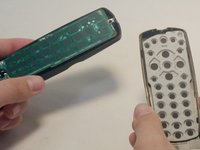
      • Starting to the side of the front LED, pry up the top of the remote.

      • Remove the top of the remote to expose the circuit board.

      Ask FixBot

      Add Comment

    2. Generic TV Remote IR LED Replacement: step 2, image 1 of 3 Generic TV Remote IR LED Replacement: step 2, image 2 of 3 Generic TV Remote IR LED Replacement: step 2, image 3 of 3
      • Remove the circuit board by gently lifting it from the casing.

      • Flip over the board so that the leads of the LED are facing upward.

      Ask FixBot

      Add Comment

    3. Generic TV Remote IR LED Replacement: step 3, image 1 of 1
      • Clip the leads of the LED.

      • Bend the LED downward until it makes a 90 degree angle with the circuit board.

      Ask FixBot

      Add Comment

    4. Generic TV Remote IR LED Replacement: step 4, image 1 of 1
      • Desolder the broken LED using a soldering iron and desoldering braid.

      Ask FixBot

      Add Comment

    5. Generic TV Remote IR LED Replacement: step 5, image 1 of 1
      • Solder the new LED in the same spot as the old one.

      • Make sure that the longer lead (positive) goes through the opening marked positive (+) before soldering.

      Ask FixBot

      Add Comment

    6. Generic TV Remote IR LED Replacement: step 6, image 1 of 3 Generic TV Remote IR LED Replacement: step 6, image 2 of 3 Generic TV Remote IR LED Replacement: step 6, image 3 of 3
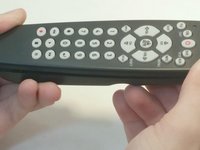
      • Make sure the buttons and the circuit board are placed correctly before reassembly.

      Ask FixBot

      Add Comment

    7. Generic TV Remote IR LED Replacement: step 7, image 1 of 1
      • To check if your remote is now working, first make sure the batteries are in correctly. Then, press any button and aim the remote at a smartphone camera. If the LED is working, a red flashing light will be reflected in the camera.

      Ask FixBot

      Add Comment

Conclusion

To reassemble your device, follow these instructions in reverse order.

Cancel: I did not complete this guide.

3 other people completed this guide.

0 Guide Comments

Add Comment

View Statistics:

Past 24 Hours: 5

Past 7 Days: 18

Past 30 Days: 103

All Time: 15,429