15% Off Selected iFixit Tools — Limited Time
Free Shipping on Domestic Orders $75+

Game Boy Cartridge Battery Replacement

What you need

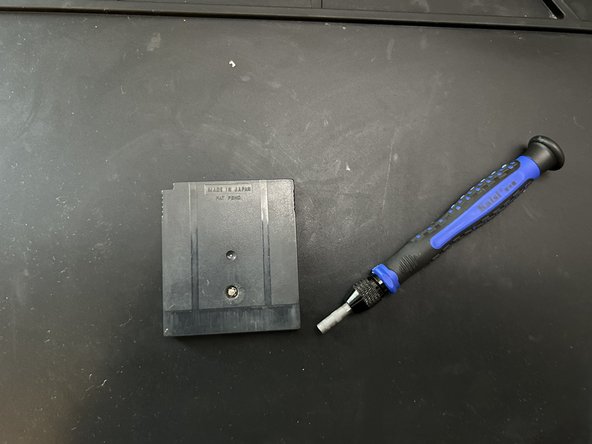
  1. Game Boy Cartridge Battery Replacement, Battery: step 1, image 1 of 2 Game Boy Cartridge Battery Replacement, Battery: step 1, image 2 of 2
    • Use the screwdriver to loosen the screw on the cartridge.

    Ask FixBot

    Add Comment

  2. Game Boy Cartridge Battery Replacement: step 2, image 1 of 1
    • Switch on your multimeter and select the Voltage (V) mode. Then, test the voltage of the battery in the cartridge.

    Ask FixBot

    Add Comment

  3. Game Boy Cartridge Battery Replacement: step 3, image 1 of 1
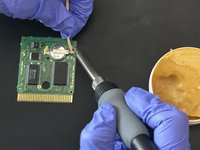
    • Apply some of the flux paste to help desolder the soldered areas on the battery.

    Ask FixBot

    Add Comment

  4. Game Boy Cartridge Battery Replacement: step 4, image 1 of 1
    • Be careful when handling a fully heated soldering iron, as it can burn you.

    • Use the soldering iron once it heats up fully. Then, heat up the soldered areas with the iron.

    Ask FixBot

    Add Comment

  5. Game Boy Cartridge Battery Replacement: step 5, image 1 of 2 Game Boy Cartridge Battery Replacement: step 5, image 2 of 2
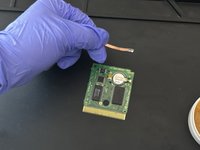
    • Pick up the solder with the desoldering braid.

    Ask FixBot

    Add Comment

  6. Game Boy Cartridge Battery Replacement: step 6, image 1 of 1
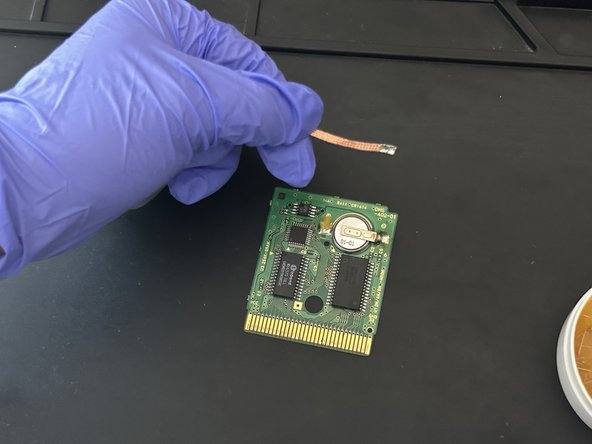
    • Wipe off any excess flux paste.

    • The flux paste can damage the circuit board if not removed completely or spread to other areas on the circuit board.

    Ask FixBot

    Add Comment

  7. Game Boy Cartridge Battery Replacement: step 7, image 1 of 2 Game Boy Cartridge Battery Replacement: step 7, image 2 of 2
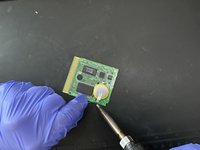
    • Make sure to align the battery's positive side where the positive indicator is and the negative side where the negative indicator is.

    • Use the soldering iron and soldering wire to solder both sides of the battery into place.

    Ask FixBot

    Add Comment

  8. Game Boy Cartridge Battery Replacement: step 8, image 1 of 1
    • Switch on your multimeter and select the Voltage (V) mode. Then, test the voltage of the battery in the cartridge.

    • The battery has to have at least 1.5V. If the multimeter reads a negative value, then most likely, the terminals are placed opposite, so switch them around and check the resulting value once more.

    Ask FixBot

    Add Comment

  9. Game Boy Cartridge Battery Replacement: step 9, image 1 of 2 Game Boy Cartridge Battery Replacement: step 9, image 2 of 2
    • Align the cartridge and the circuit board.

    • Then tighten the screw to secure the cartridge into place.

    Ask FixBot

    Add Comment

Conclusion

To reassemble your game cartridge, follow step 9.

Cancel: I did not complete this guide.

10 other people completed this guide.

Jose Ayala

Member since: 12/06/23

533 Reputation

1 Guide authored

Team

1 Guide Comment

Hi, I think the CR2032 is to big. On the cartridge PCB is written: CR1616. I think this is the correct battery. But I have one unofficial gameboy cartridge, which use a CR2032, but for original cartridges it is too big.

Keywan - Reply Share

Add Comment

View Statistics:

Past 24 Hours: 19

Past 7 Days: 115

Past 30 Days: 608

All Time: 12,112