Game Boy Micro Battery Replacement

What you need

  1. Game Boy Micro Battery Replacement, Remove the Cover: step 1, image 1 of 2 Game Boy Micro Battery Replacement, Remove the Cover: step 1, image 2 of 2
    • Remove the Phillips #00 screw on the side of the Game Boy closest to the directional pad.

    • Once the screw has been loosened, lift the cover off the back of the device.

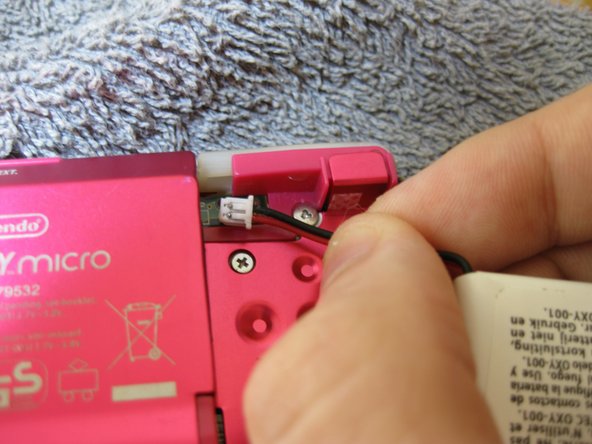
  2. Game Boy Micro Battery Replacement, Remove battery: step 2, image 1 of 3 Game Boy Micro Battery Replacement, Remove battery: step 2, image 2 of 3 Game Boy Micro Battery Replacement, Remove battery: step 2, image 3 of 3
    • Grip, and gently pull outwards on the cable as close to the battery connector as you can

    • Pull in level with the back cover in the direction as indicated by the arrow (not upwards, and not sideways), otherwise you could damage the connector, the cable, or just rip everything off.

    • When plugging the battery back in, make sure to use a non-conductive tool with a flat head to push the battery plug back into the connector, to avoid shorting the battery pins in the plug.

Conclusion

To reassemble your device, follow these instructions in reverse order.

One other person completed this guide.

SonoSooS

Member since: 07/30/24

242 Reputation

2 Guides authored

0 Guide Comments

Add Comment

View Statistics:

Past 24 Hours: 2

Past 7 Days: 32

Past 30 Days: 117

All Time: 1,739