Introduction
If your Gateway ML6720 laptop has been having wireless connectivity issues that cannot be blamed on software problems, use this guide to replace your laptop wireless card.
The wireless card is how your laptop connects to wireless sources, such as wifi or Bluetooth. A faulty card can mean your device regularly fails to connect to the internet over wireless connections, or to Bluetooth sources.
Before using this guide, be sure to check that other devices can connect to whatever source has been disconnecting to ensure that the issue is with your laptop and not the access point, as well as to check that there are no faults with the software controlling this, such as your laptop being turned on to airplane mode or having either wifi or Bluetooth off.
What you need
-
-
-
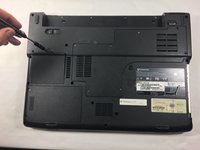
Locate the wireless card cover, found on the middle-left section of the laptop as shown.
-
-
-
-
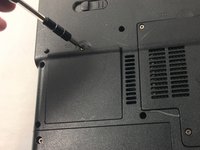
Using the 1.5 mm Flathead Screwdriver, remove the cover screw at the top of the wireless card's cover plate.
-
-
Tool used on this step:Flathead 1.5 mm Screwdriver$1.99
-
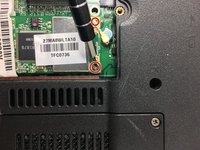
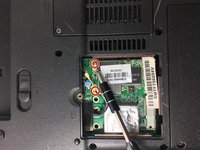
Using the 1.5 mm Flathead Screwdriver, remove the two screws at the top left and right corners of the wireless card.
-
Slide the wireless card up and out of the compartment.
-

 Ask FixBot




To reassemble your device, follow these instructions in reverse order.
Cancel: I did not complete this guide.
2 other people completed this guide.

Team

UMass Dartmouth, Team 2-3, Isaacson Fall 2016 Member of UMass Dartmouth, Team 2-3, Isaacson Fall 2016
UMASSD-ISAACSON-F16S2G3
2 Members
60 Guides authored
