Free Shipping on Domestic Orders $75+

Framework Laptop 16" (2025) Numpad Installation

Archived Guide
This guide is retained solely for historical purposes. Use the updated version of the guide to perform your repair.
Prerequisite Only
This is a prerequisite-only guide! This guide is part of another procedure and isn’t meant to be used alone.
    1. Framework Laptop 16" (2025) Numpad Installation, Before you begin: step 1, image 1 of 2 Framework Laptop 16" (2025) Numpad Installation, Before you begin: step 1, image 2 of 2
      • Unplug all cables and fully shut down your laptop.

      • If your repair requires a spudger, a T5 Torx, or a Phillips screwdriver, you can use the included Framework screwdriver. Whichever works best for you!

      Ask FixBot

      Add Comment

    1. Framework Laptop 16" (2025) Numpad Installation, Remove the touchpad spacers: step 2, image 1 of 3 Framework Laptop 16" (2025) Numpad Installation, Remove the touchpad spacers: step 2, image 2 of 3 Framework Laptop 16" (2025) Numpad Installation, Remove the touchpad spacers: step 2, image 3 of 3
      • Use your fingers to slide the touchpad spacer toward the bottom edge of the laptop and unclip it.

      • If you're having trouble, check if the corresponding Input Module latch is properly unlocked.

      • Lift the touchpad spacer off the laptop and remove it.

      Ask FixBot

      Add Comment

    2. Framework Laptop 16" (2025) Numpad Installation: step 3, image 1 of 1
      • Repeat the same procedure for the other touchpad spacer.

      Ask FixBot

      Add Comment

    1. Framework Laptop 16" (2025) Numpad Installation, Remove the touchpad: step 4, image 1 of 3 Framework Laptop 16" (2025) Numpad Installation, Remove the touchpad: step 4, image 2 of 3 Framework Laptop 16" (2025) Numpad Installation, Remove the touchpad: step 4, image 3 of 3
      • Use your fingers to slide the touchpad toward the bottom edge of the laptop and disconnect it.

      • If you're having trouble, check if the Input Module latches are properly unlocked.

      • Lift the touchpad and remove it.

      • During reassembly, perform the following:

      • Place the touchpad flat on its cutout so its clips are properly aligned.

      • Press the touchpad down and slide it into place so it lines up evenly with the bottom edge of the laptop.

      Ask FixBot

      Add Comment

    1. Framework Laptop 16" (2025) Numpad Installation, Remove the keyboard: step 5, image 1 of 3 Framework Laptop 16" (2025) Numpad Installation, Remove the keyboard: step 5, image 2 of 3 Framework Laptop 16" (2025) Numpad Installation, Remove the keyboard: step 5, image 3 of 3
      • The keyboard is held in place with strong magnets. Apply gradually increasing force to avoid having the keyboard violently eject.

      • Grip the two pull tabs along the bottom of the keyboard.

      • Lift the pull tabs until the keyboard magnets release.

      • Remove the keyboard.

      • During reassembly, make sure the keyboard is seated properly on its alignment pegs and sits evenly with the edges of the laptop.

      Ask FixBot

      Add Comment

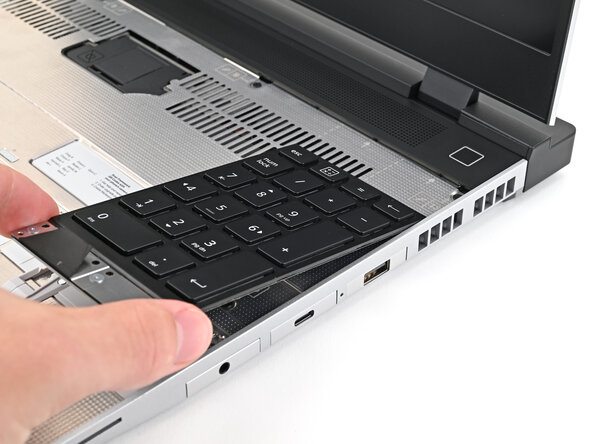
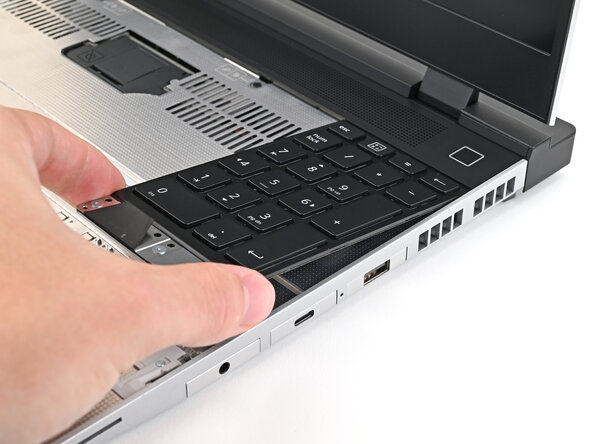
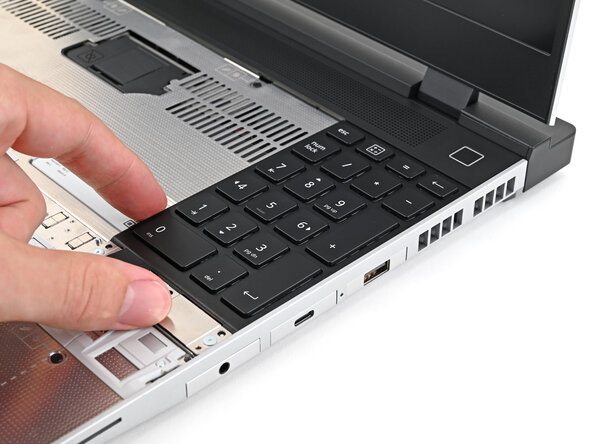
    1. Framework Laptop 16" (2025) Numpad Installation, Remove the numpad: step 6, image 1 of 3 Framework Laptop 16" (2025) Numpad Installation, Remove the numpad: step 6, image 2 of 3 Framework Laptop 16" (2025) Numpad Installation, Remove the numpad: step 6, image 3 of 3
      • The numpad is held in place with strong magnets. Apply gradually increasing force to avoid having the numpad violently eject.

      • Grip the pull tab at the bottom of the numpad.

      • Lift the pull tab until the numpad magnets release.

      • Remove the numpad.

      • During reassembly, make sure the numpad is seated properly on its alignment pegs and sits flush with the edges of the laptop.

      Ask FixBot

      Add Comment

Conclusion

To reassemble your device, follow these instructions in reverse order.

Cancel: I did not complete this guide.

Alex Diaz-Kokaisl

Member since: 01/16/22

250,105 Reputation

1,203 Guides authored

0 Guide Comments

Add Comment

View Statistics:

Past 24 Hours: 1

Past 7 Days: 5

Past 30 Days: 9

All Time: 95