-
-
-
Fingerprint Reader Cable
-
Keyboard Membrane Cable
-
Keyboard Backlight Cable
-
The replacement touchpad comes with a Touchpad Cable pre‑installed, so you don't have to disconnect it.
 Ask FixBot
-
-
-
Use the flat end of your Framework Screwdriver, or a clean fingernail, to lift up the locking tab on the Fingerprint Reader ZIF connector on the touchpad.
-
-
-
Use your fingers to lightly grip the Fingerprint Reader Cable and slide it straight out of its socket.
-
-
-
Use the flat end of your Framework Screwdriver, or a clean fingernail, to lift up the locking tab on the keyboard membrane ZIF connector on the touchpad.
-
-
-
-
Use your fingers to lightly grip the keyboard membrane cable and slide it straight out of its socket.
-
-
-
Use the flat end of your Framework Screwdriver, or a clean fingernail, to lift up the locking tab on the keyboard backlight ZIF connector on the touchpad.
-
-
-
Use your fingers to lightly grip the keyboard backlight cable and slide it straight out of its socket.
-
-
-
Use your Framework Screwdriver to remove the two 1.8 mm‑long Phillips screws securing the touchpad bracket.
-
-
-
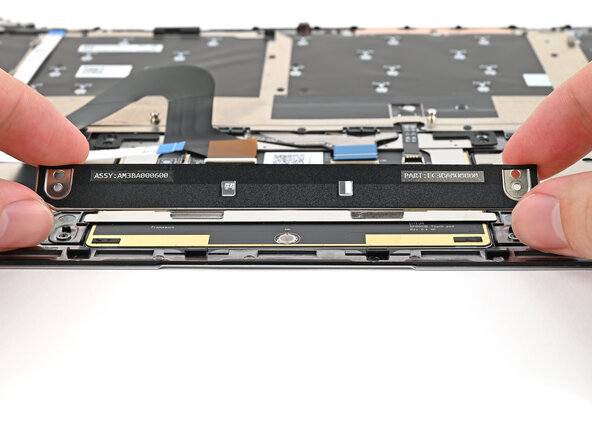
Lift the touchpad bracket towards the top of the Input Cover to release its two metal clips.
-
Remove the touchpad bracket.
-
-
-
Use your Framework Screwdriver to remove the two 1.8 mm‑long Phillips screws securing the touchpad.
-
-
-
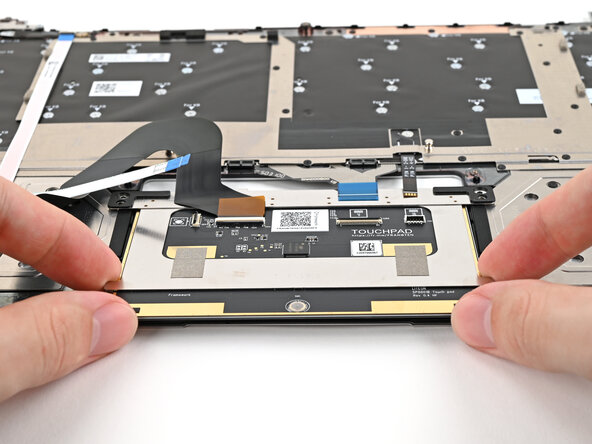
Use your fingers to lift the bottom edge of the touchpad and pull it towards the bottom edge of the Input Cover to release its two metal clips.
-
Remove the touchpad.
-
-






To reassemble your device, follow these instructions in reverse order.

