Free Shipping on Domestic Orders $75+

Framework Laptop 13 Pro Storage Removal

Prerequisite Only
This is a prerequisite-only guide! This guide is part of another procedure and isn’t meant to be used alone.
    1. Framework Laptop 13 Pro Storage Removal, Remove the SSD screw: step 1, image 1 of 2 Framework Laptop 13 Pro Storage Removal, Remove the SSD screw: step 1, image 2 of 2
      • Use your Framework Screwdriver to remove the 3.0 mm‑long T5 Torx screw securing the SSD.

      • The SSD might pop up at a shallow angle when you remove the screw.

      Ask FixBot

      Add Comment

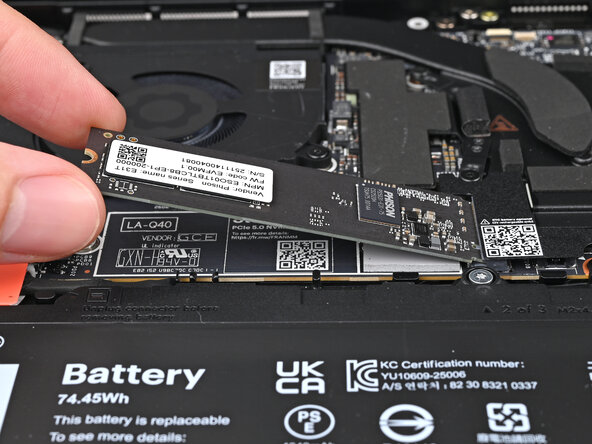
    2. Framework Laptop 13 Pro Storage Removal, Remove the SSD: step 2, image 1 of 2 Framework Laptop 13 Pro Storage Removal, Remove the SSD: step 2, image 2 of 2
      • Grip the end of the SSD with the screw hole and slide it out of its socket.

      • Remove the SSD.

      Ask FixBot

      Add Comment

Conclusion

To reassemble your device, follow these instructions in reverse order.

Cancel: I did not complete this guide.

Alex Diaz-Kokaisl

Member since: 01/16/22

250,018 Reputation

1,203 Guides authored

0 Guide Comments

Add Comment

View Statistics:

Past 24 Hours: 0

Past 7 Days: 0

Past 30 Days: 0

All Time: 16