Free Shipping on Domestic Orders $75+

Framework Laptop 13 Pro Interposer Installation

Prerequisite Only
This is a prerequisite-only guide! This guide is part of another procedure and isn’t meant to be used alone.
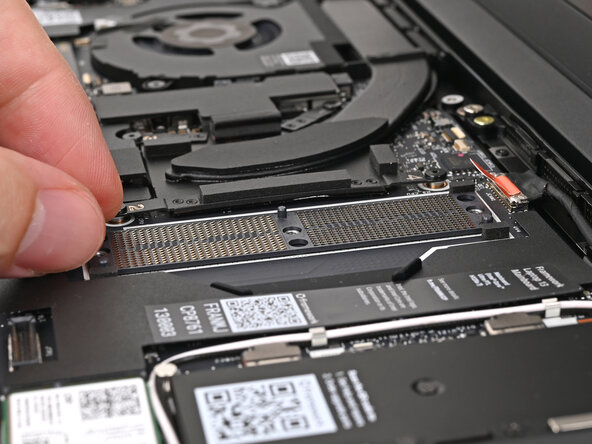
    1. Framework Laptop 13 Pro Interposer Installation, Place the LPCAMM2 Memory Interposer: step 1, image 1 of 3 Framework Laptop 13 Pro Interposer Installation, Place the LPCAMM2 Memory Interposer: step 1, image 2 of 3 Framework Laptop 13 Pro Interposer Installation, Place the LPCAMM2 Memory Interposer: step 1, image 3 of 3
      • The Interposer only slots in the Mainboard one way. Use the holes in the Mainboard and the pegs in the Interposer to help orient it. The notch in the Interposer should be at the bottom left corner.

      • Place the Interposer onto the Mainboard, making sure it slots in properly and that it sits flat surrounded by four sponges.

      • You may have to lightly bend the orange Webcam Cable connector tab to keep it out of the way.

      Ask FixBot

      Add Comment

Conclusion

To reassemble your device, follow these instructions in reverse order.

Cancel: I did not complete this guide.

Alex Diaz-Kokaisl

Member since: 01/16/22

249,973 Reputation

1,203 Guides authored

0 Guide Comments

Add Comment

View Statistics:

Past 24 Hours: 0

Past 7 Days: 2

Past 30 Days: 12

All Time: 34